Scan REST API
REST (Representational State Transfer) is an architectural style that can be used to communicate with web services. REST has a lot in common with protocols such as SOAP. It's used as a communication mechanism between two applications, or between an application and an online service. Many mobile web applications communicate with a RESTful API at the backend to communicate with the online service.
You can scan a RESTful API Web Service in both Invicti Enterprise and Invicti Standard editions.
For further information, please see How to Ensure REST API Security and Invicti API Documentation.
Differences between a web service and a REST API
Many web services rely on complex communication mechanisms such as SOAP, RPC, and CORBA. REST uses the standard HTTP methods for all four CRUD (Create, Read, Update, Delete) operations.
Commonly used HTTP methods
This list shows the commonly used HTTP methods (verbs) in REST.
POSTcreates a resourceGETretrieves a resourcePUTchanges the state of a resource or updates itDELETEremoves or deletes a resource
The challenges of scanning REST API interfaces
Unlike RPC and others, REST can be easily consumed and understood by users because of its simple structure. For example, many REST-based web services can provide a response in JSON or XML format. But this same benefit is what makes it very difficult for an automated web vulnerability scanner to crawl and attack.
Lack of standards for REST
There is no consistent standard for REST API, as there is for WSDL and other similar protocols. Most RESTful web services have their own documentation, useful for developers but useless to automated web vulnerability scanners.
A number of projects aim to standardize the REST API:
Usage of parameters in URLs
Another challenge automated scanners encounter when scanning RESTful web services for vulnerabilities is that REST APIs use parameters in URLs.
For example, in the HTTP GET request following, 123 is a parameter and not a directory in the web application:
GET http://www.example.com/rest-api/products/123/
Invicti deals with this using heuristic URL Rewrite technology that can automatically identify and scan parameters in URLs. In a REST API things work a little differently.
Scan a RESTful API for vulnerabilities
There are three ways to scan a RESTful API. Each is outlined in the following:
- Import the definition files manually
- Automate the discovery of RESTful APIs during crawling
- Import RAW HTTP requests manually
Import the definition files manually
When you import an OpenAPI (formerly Swagger), WADL, or WordPress REST API definition file, the Invicti web application security scanner parses the definition file and creates a link for every resource available in the API.
There are 2 methods to manually import the definition file: from file and from URL.
- The From File option lets you import your document to Invicti. This requires you to import the file over and over again whenever you update your web service.
- The From URL option lets you provide a link for the definition file, so you don't need to import it again to Invicti whenever you update your web service. For more information, refer to the Import links and API definitions document.
Import the definition file from the file to Invicti
Import OpenAPI, WADL, or WordPress definition files from the file in Invicti Enterprise
- Select Scans > New Scan from the left-side menu.
- From the Scan Settings section, go to the Links/API Definitions tab.
- From the From File section, click the Web Application Description Language (WADL) option.
- From the opened window, browse to the schema file and select it, then click Open.
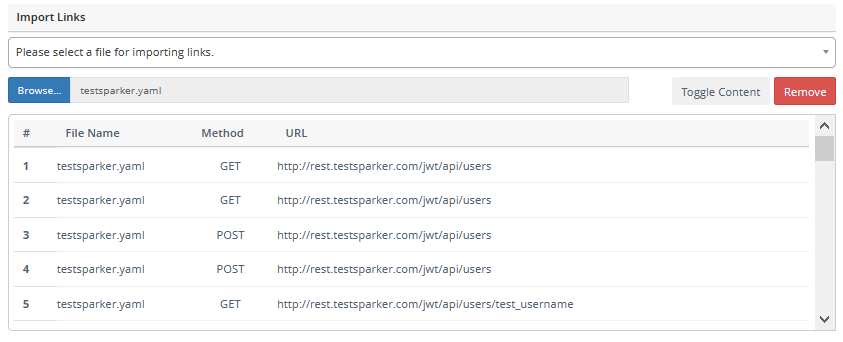
- Once the scanner imports all the schema you can see them in the list of Imported Links as seen in the screenshot.
- Select Launch to start the scan.
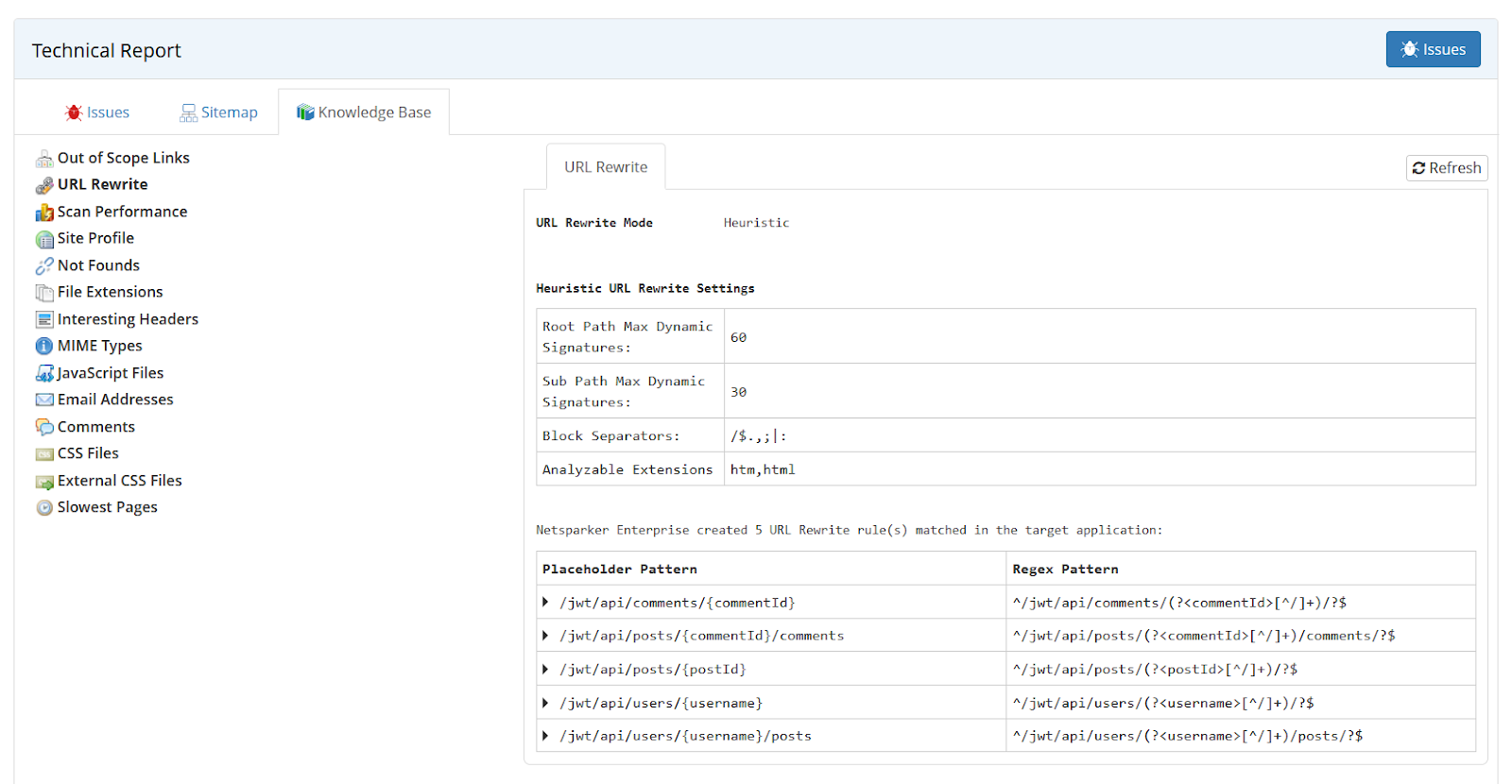
During the import, URL Rewrite Rules are automatically generated, so that every parameter in the RESTful API is scanned.
When importing a RESTful web service definition file in Invicti Enterprise, the URL Rewrite rules aren't shown in the Start a New Scan page, but they're reported in the Knowledge Base node, either once the scan is finished or during the scan.
Import OpenAPI, WADL, or WordPress definition files from the file in Invicti Standard
- Select New in the Home tab.
- From the Start a New Website or Web Service Scan dialog, go to the Links/API Definitions tab, then double-click Web Application Description Language (WADL).
- From the Import Links window, browse to the schema file and select it, then click Open.
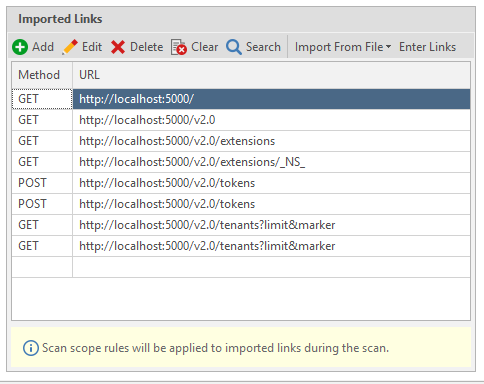
- Once the scanner imports all the schema you can see them in the list of Imported Links as seen in the screenshot.
- Select Start Scan.
Import the definition file from the URL to Invicti
Import definition files from the URL in Invicti Enterprise
- Select Scans > New Scan from the left-side menu.
- From the Scan Settings section, go to the Links/API Definitions tab.
- From the From URL section, click the Web Application Description Language (WADL) option.
- From the Add an URL dialog, enter the URL.
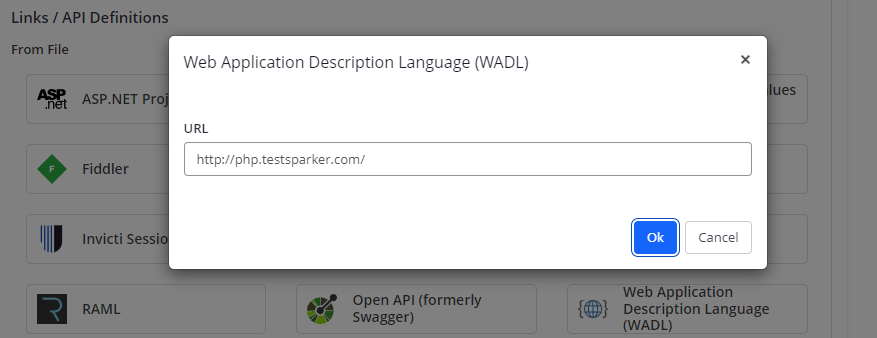
- Select OK to import the definition file from the URL to Invicti.
- Select Launch to start the scan.
When importing a RESTful web service definition file in Invicti Enterprise the URL Rewrite rules are not shown in the Start a New Scan dialogue, but they're reported in the Knowledge Base Nodes once the scan is finished.
Import definition files from the URL in Invicti Enterprise in Invicti Standard
- Select New in the Home tab.
- From the Start a New Website or Web Service Scan dialog, go to the Links/API Definitions tab, then double-click Web Application Description Language (WADL).
- On the Web Application Description Language (WADL) dialog, enter an URL.
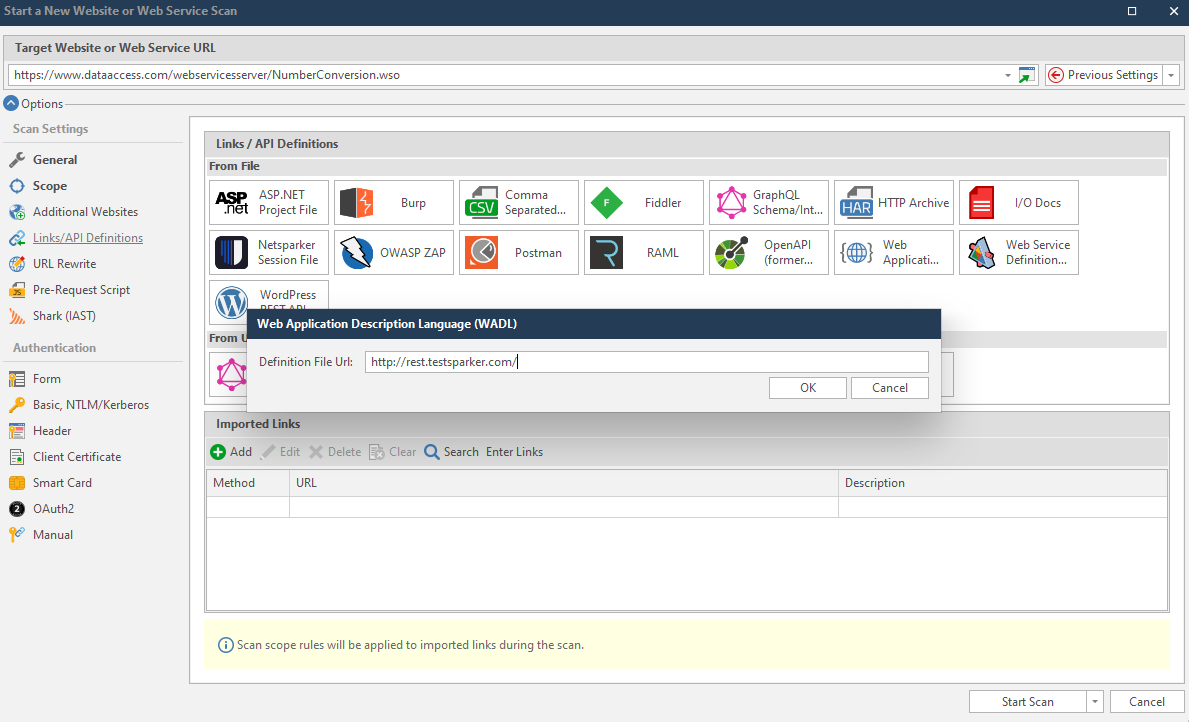
- Select OK to import the definition file from the URL to Invicti.
- Select Start Scan.
Automate the discovery of RESTful APIs
Similar to when scanning other web applications and services, authentication can be configured from the Authentication tab.
Automate the discovery of the RESTful API during crawling
The Invicti web application security scanner automatically imports, crawls, and scans a REST API web service, if it's identified during a scan. Once the scanner identifies the definition file, it automatically generates the URL Rewrite rules so it can scan all the parameters in the web service.
When the scanner identifies a RESTful API web service during a crawl it also reports it in the Knowledge Base node.
This is what the REST APIs node looks like in the Knowledge Base section of the Technical Report in Invicti Enterprise.
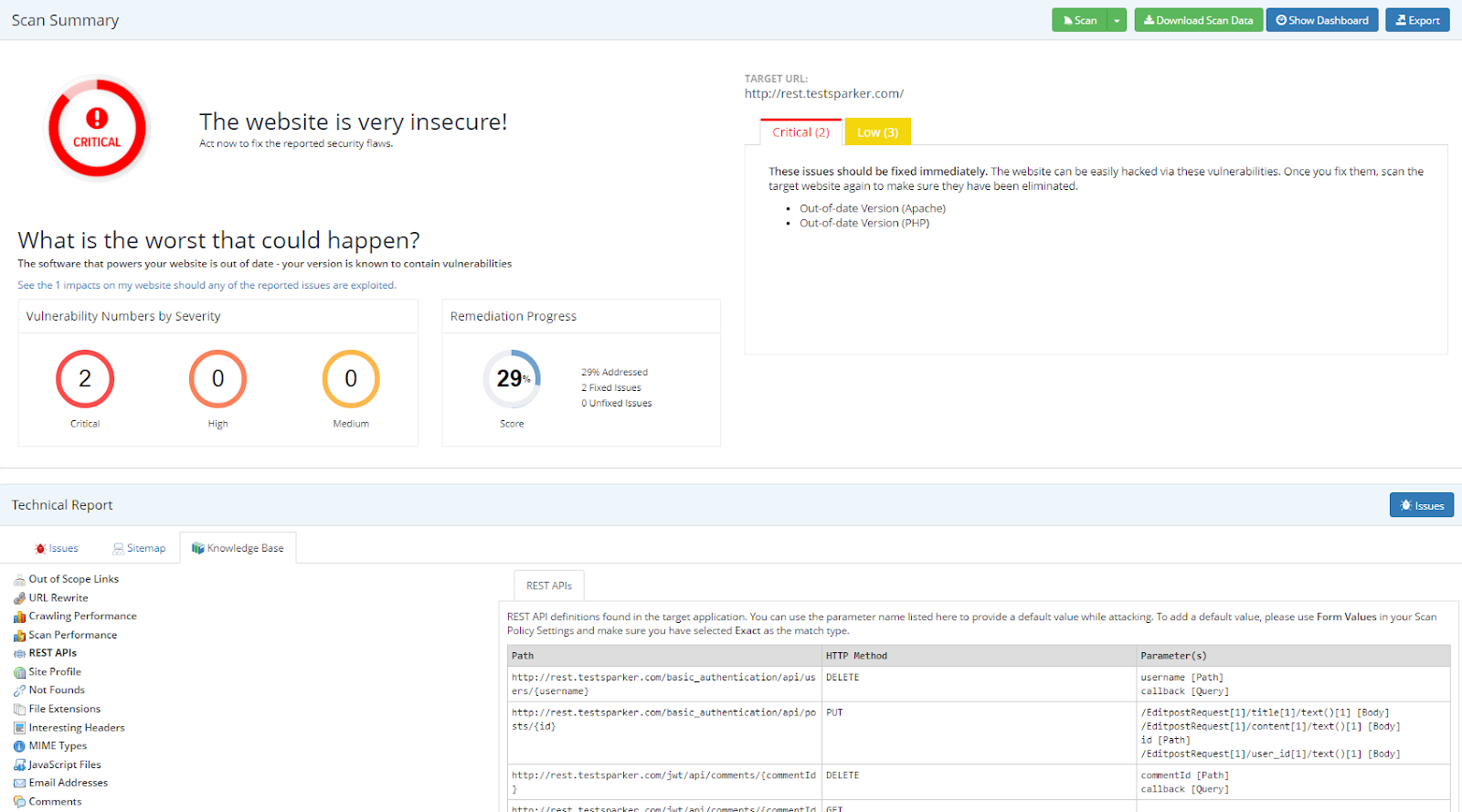
This is what REST APIs look like in the Scan Summary Dashboard in Invicti Standard.
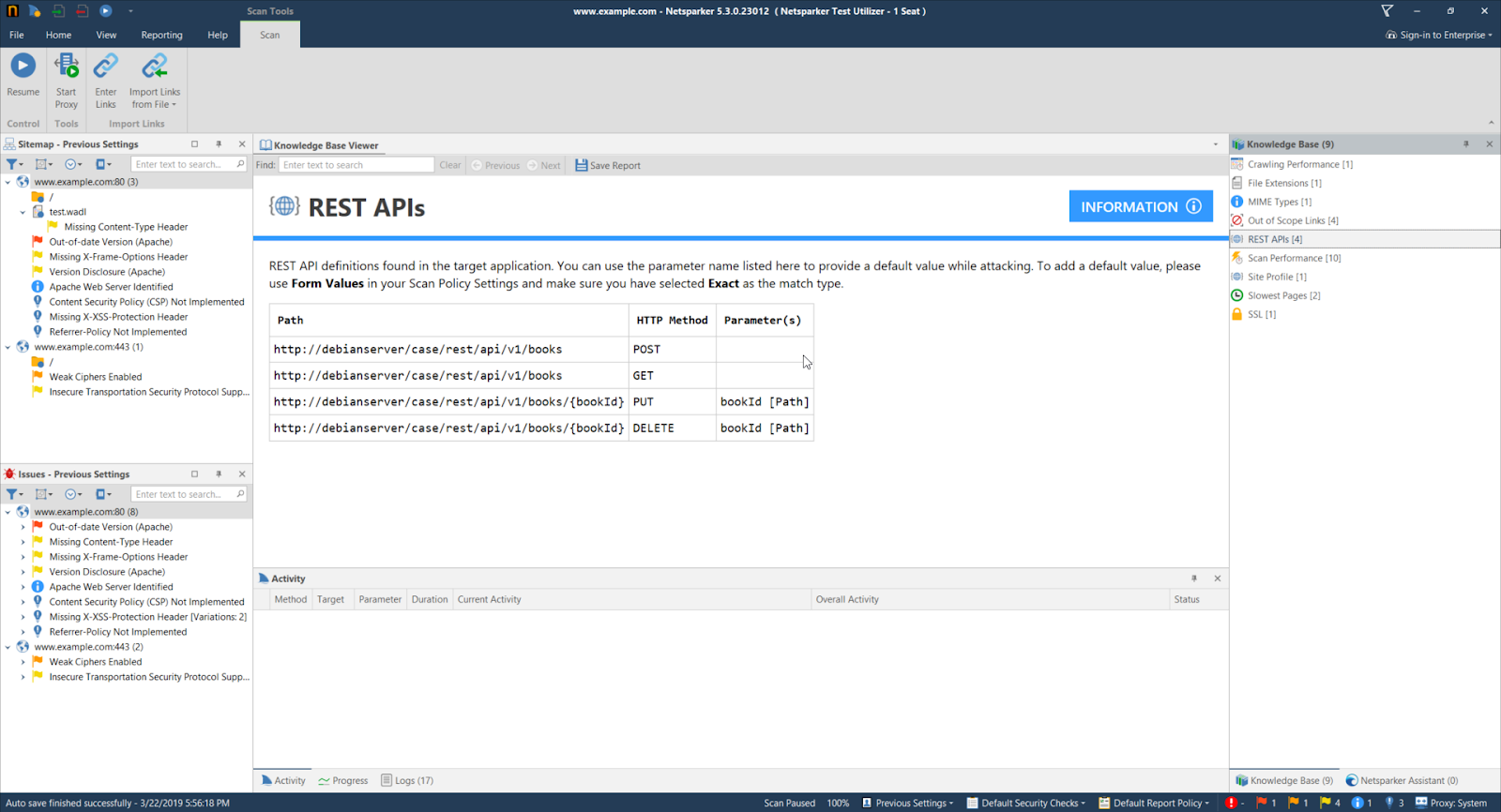
Should the scanner identify references to a RESTful API web service during the Crawling stage (via JavaScript or other means) but then fail to identify the definition file, once it has the necessary samples it still tries to heuristically create the URL Rewrite Rules to scan all the parameters.
Import raw HTTP requests manually
In cases where the OpenAPI (formerly Swagger) or WADL definition files aren't available, or the RESTful API can't be identified during the crawl of a web application, you can import the APIs links via RAW HTTP files.
You can capture the HTTP requests via a third party proxy tool such as Fiddler and import them before starting the scan. Here is a list of supported proxy files:
- Burp Saved Items (*.xml)
- Fiddler session archives (*.saz)
- HTTP archive files (*.har)
- Paros log files (*.txt)
- Note that when using this method the scanner doesn't automatically generate the URL rewrite rules. Configure the URL Rewrite Rules manually.
Import raw HTTP requests manually
The procedure for importing these tools manually is the same as that for importing Swagger or WADL (refer to the Import the definition files manually section).
Need help?
Invicti Support team is ready to provide you with technical help. Go to Help Center