Scan restricted areas
This document is for Invicti Platform
If your target web application has restricted areas that require logging into the site, you may need to configure the target settings so that Invicti Platform can scan those restricted areas. This is done through the Authentication section on the Target Settings page for your selected target. It's also referred to as form authentication.
The following options are available to authenticate the login form:
- Simple form
- OAuth 2.0
- Login Sequence Recorder
- HTTP authentication
- Client certificate
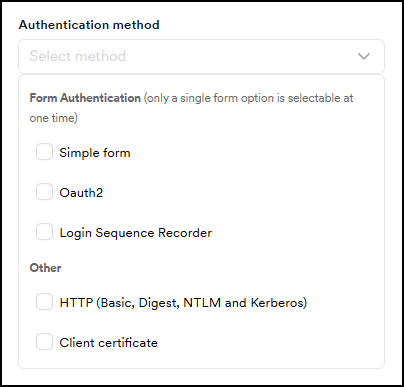
This document provides an overview of the authentication methods.
Simple form
Selecting this option tells Invicti to automatically detect restricted areas and try to identify the necessary steps to log in. This option works for most web applications that use a simple login process. Provide a valid username and password for the scanner to access the restricted area. The scanner automatically detects the login link, the logout link, and the mechanism used to maintain the session active. Using the provided login credentials, Invicti can then scan the restricted areas of your target web application. The option also supports the use of Time-based One-Time Password (TOTP).
For more information, refer to the Configure simple form authentication and Configure simple form authentication with OTP.
OAuth2
Invicti supports the OAuth 2.0 authentication mechanism, enabling you to configure scans for websites that require it. For information about adding an OAuth login sequence to a target, refer to the Configuring OAuth2 authentication document.
Pre-recorded login sequence
For more complex web applications, which might be using a more elaborate login mechanism, you need to launch the built-in Login Sequence Recorder (LSR) and record a login sequence (*.lsr file), which is uploaded and saved with your target settings. Alternatively, you can convert and import a Selenium script file. For more information, refer to the Converting Selenium scripts to Invicti LSR files document.
A login sequence is used to perform the following tasks during the crawling and scanning phases:
- Access form-based password-protected areas
- Replay login actions to authenticate to the website or web application
- Restrict actions that the crawler and scanner can access (such as logout links)
- Mark actions that require manual intervention each time they are accessed, such as pages with CAPTCHAs, one-time passwords, and two-factor authentication.
The built-in LSR also supports the use of Time-based One-Time Passwords (TOTP) in the login mechanism. For more information, refer to Recording a login sequence and Configuring form authentication with OTP.
HTTP authentication
The information necessary to authenticate the user is sent in the “Authentication: Basic” header. For more information, refer to the HTTP Authentication document.
Client certificate
Configure your target to log in using a certificate file. For more information, refer to the Client certificate document.
Need help?
Invicti Support team is ready to provide you with technical help. Go to Help Center