Deployment: Invicti Platform on-demand, Invicti Platform on-premises
Scan authenticated targets
Most web applications and websites require some form of authentication - either as a whole or in an area. While some scanners can detect standard authentication forms, in the case of many custom web applications, you need a mechanism to repeat the steps that a human would take.
Invicti Platform provides several options for scanning authenticated targets, including an automated mechanism that detects and handles standard login forms with the login data that you supply. For more complex web applications, you can launch the Invicti Platform Login Sequence Recorder (LSR) and record a login sequence (a .lsr file) that's uploaded and saved with your target settings. If your web asset uses One-Time Passwords (OTP), you can include these in the automated login mechanism and recorded login sequence. Invicti also supports scanning web assets with OAuth 2.0 authentication flows.
This document outlines the main configuration steps required for Invicti Platform to scan an authenticated target. For full instructions, refer to the listed documents.
Why this matters
Most of an application's features sit behind a login, so an unauthenticated scan only sees the public surface and misses the pages, APIs, and data that matter most. Configuring authentication lets Invicti scan as a signed-in user and reach those protected areas, giving you coverage of the parts of your target an attacker would reach after logging in.
Steps to scan an authenticated target
- Create a target. For detailed instructions, refer to the Add a new target document.
- Open the target in edit mode, and select Authentication.
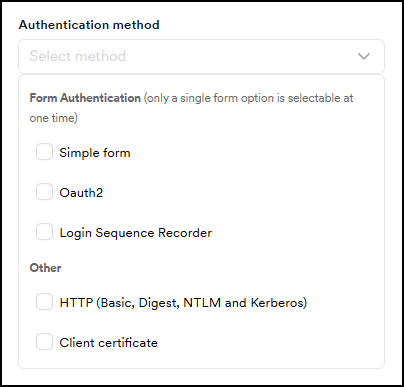
- Specify the Authentication method.
-
Fill in the required fields for your chosen authentication mechanism or record a login sequence. Ensure you also set up OTP with the automated login mechanism and recorded login sequence if required. For detailed instructions, refer to the relevant documentation:
- Simple form
- Simple form with OTP
- OAuth 2.0
- Login sequence recorder
- Login sequence with OTP
- Login sequence with secrets (on-demand only)
- HTTP authentication
- Client certificate
- IDOR/BOLA authentication (API targets only)
-
Select Save target configuration to confirm. Invicti updates the target and uses the preferred authentication method the next time you run a scan.
-
Select Scan and select Run scan with default or Run custom scan.
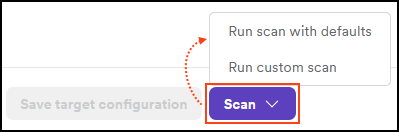
- Invicti queues the scan and initiates scanning according to the schedule you specify in the scan options.
Scan results
The Scan details page displays the progress and results of the scan. Open the Site Structure tab to confirm that Invicti scanned the authenticated areas of your target.
For more information, refer to the Review scan results document. If the scan shows the login sequence is invalid alert, refer to the Login sequence is invalid document.
Troubleshooting
The scan didn't reach the authenticated areas of the target
On the Scan details page, go to the Site Structure tab to see which areas Invicti scanned (see Site structure). If authenticated pages are missing, confirm you configured the authentication method correctly and that the credentials or recorded login sequence are still valid. For form-based logins, verify the login succeeds manually with the same credentials. For OAuth 2.0, confirm the token hasn't expired.
The IDOR / BOLA authentication method isn't available for the target
The IDOR / BOLA authentication method appears only for API targets. Confirm your target is an API target (see add an API target). For other target types, use one of the other authentication methods linked in the preceding steps.
Need help?
Invicti Support team is ready to provide you with technical help. Go to Help Center