Package: Invicti AppSec Enterprise (on-premise, on-demand)
Semgrep CE
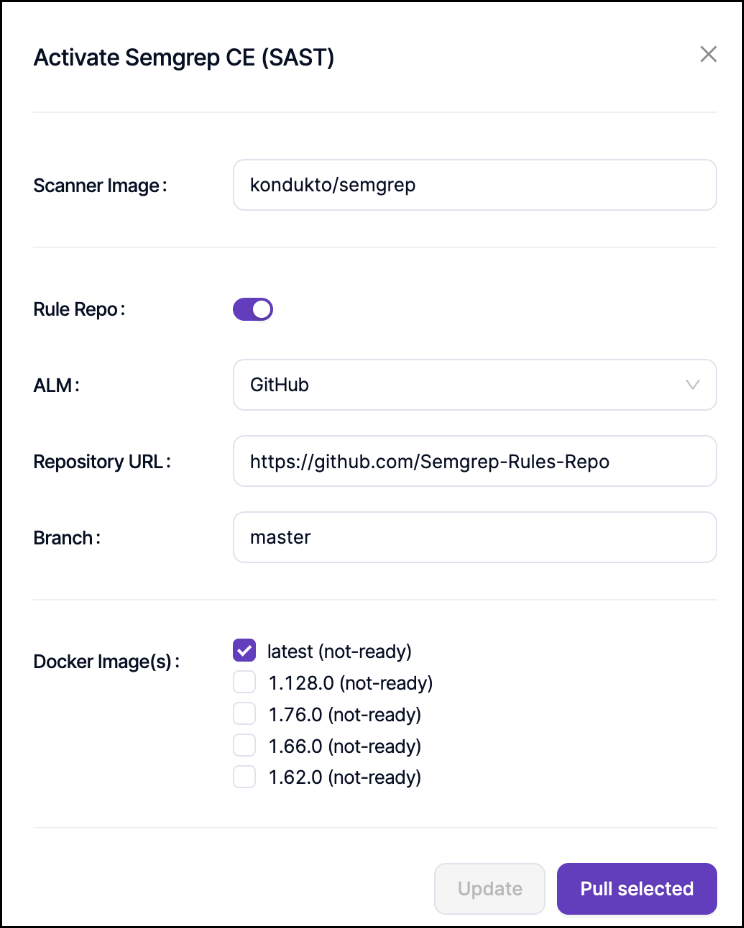
Semgrep Community Edition (CE) can be enabled through the Scanners section under the SAST category. During the integration, you must define the repository address that contains the Semgrep rule files. This repository serves as the source of rules during scanning.
The official Semgrep rules repository can be used as the rule source during integration. The repository is publicly available at GitHub | Semgrep Rules and provides a wide range of ready-to-use rules for different technologies and security use cases.
Once the integration is enabled, Semgrep CE can be configured at the project level through the scanner settings.
Rule source configuration
Semgrep CE scans support multiple methods for defining rule sources, depending on how the rules are managed and stored. Rules can be added using different methods, including Ruleset URL, Ruleset Path, and MyRules.
Ruleset URL
Use this method when a single YAML file is provided as the rule source:
- The URL must point directly to a specific YAML file, not to a directory
- Semgrep supports defining multiple rules within a single YAML file
- Provides a simple way to reference external rule files
Ruleset path
Use this method to reference rules from the repository defined during the Semgrep CE integration:
- The exact directory path of the rules within the cloned source code must be specified
- During the scan, only the rules located under this path are used
- The path must match the repository structure and must always end with a trailing slash (
/)
MyRules
This method follows the same logic as Ruleset Path:
- The directory path of the rules must be defined based on the repository URL configured at the integration level
- The directory must be specified with a trailing slash (
/) at the end of the path - Allows for custom rule organization within your repository
Both Ruleset Path and MyRules methods require the directory path to end with a trailing slash (/) for proper recognition by the scanner.
Scan configuration
To save the scan parameter configuration:
- Select the desired version from the Tag field before triggering the scan
- Configure the appropriate rule source method based on your rule management strategy
- Verify the repository access and rule path configuration
The scan configuration ensures that Semgrep CE uses the correct rule set and version for your security analysis.
Need help?
Invicti Support team is ready to provide you with technical help. Go to Help Center