Deployment: Invicti Platform on-demand, Invicti Platform on-premises
Add new API source
Invicti Platform can integrate with multiple API sources for discovering and importing your existing APIs into your Invicti API Inventory.
This document explains how to add a new API source to Invicti Platform.
API discovery and API catalog are complementary views. API discovery shows APIs added and awaiting target assignment, while the API catalog shows APIs already linked to targets and ready for scanning.
To add a new API source, you can use one of the following methods:
- Add a new source from an external platform
- Upload an API specification file from a target's scan configuration
Why this matters
Connecting API sources lets Invicti Platform continuously discover and import your API specifications so every endpoint is visible and scannable without manual effort. External platform integrations keep your API inventory synchronized automatically. Uploading a specification file directly to a target gives you precise control over exactly which API definition is used during scanning.
Add a new API source from an external platform
- Select Discovery > Configuration from the left-side menu.
- Go to the API sources section and click Add new source to open the configuration.
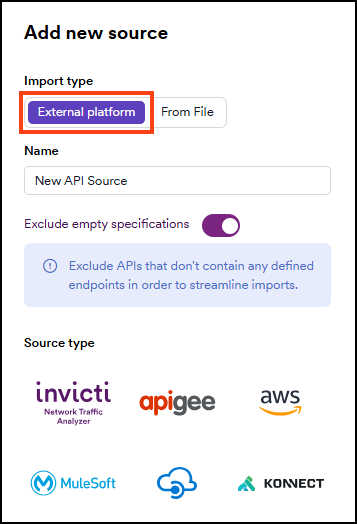
- Select External platform.
-
Enter the name for your source. In this example, enter New API Source.
-
Keep the Exclude empty specifications toggle on to exclude APIs that don't contain any defined endpoints.
-
Select the source type. Where required, enter the information from your API source and follow the on-screen instructions:
- Invicti Network Traffic Analyzer (NTA) with Istio Mesh Service or NTA with Tap Plugin
- Apigee API hub
- Amazon API Gateway
- MuleSoft Anypoint Exchange
- Azure API Management
- Kong Konnect
- Invicti Source Scan, which you select under Other
Add a new API source from a file
You upload API specification files from a target's scan configuration, not from the Discovery menu.
- Select Inventory > Targets from the left-side menu.
- Click the target name to open its settings.
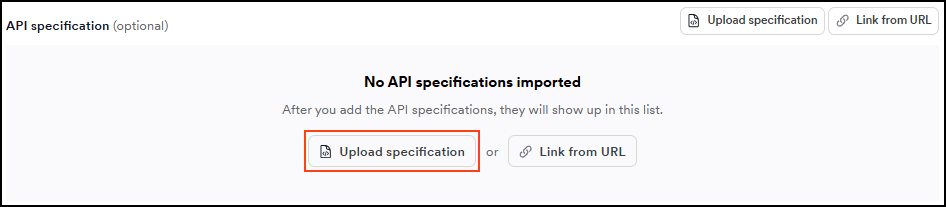
- Under Scan configuration in the left navigation, select General, then click Upload specification.
- In the Upload API specification dialog, select the specification Type from the dropdown.
- In the Base URL field, enter the root URL of the API endpoints. For example, if your page is
http://example.com, the base API URL could behttp://example.com/api/v1. - Click Choose file and select your API specification file. The file extension must match the selected Type (for example,
.jsonor.yamlfor OpenAPI / Swagger,.graphqlor.jsonfor GraphQL,.ramlfor RAML,.wadlfor WADL,.wsdlfor WSDL,.protoor.zipfor gRPC Protocol Buffer).
File size can't exceed 20 MB.
- Click Upload file.
Troubleshooting
I can't find the option to add an API source from a file in Discovery
Uploading API specification files was moved from Discovery > Configuration > API sources to the target's scan configuration. To upload a file, select Inventory > Targets from the left-side menu, open the target, select Scan configuration > General from the target's left navigation, and click Upload specification.
I uploaded a file but the API doesn't appear in the API catalog
Only API specification files uploaded directly to a target's scan configuration appear in the API catalog. APIs added via a URL link are associated with the target but don't create a catalog entry.
My file upload fails
Check the following:
- The file doesn't exceed 20 MB.
- The file extension matches the selected Type (for example,
.jsonor.yamlfor OpenAPI / Swagger,.graphqlor.jsonfor GraphQL,.ramlfor RAML,.wadlfor WADL,.wsdlfor WSDL,.protoor.zipfor gRPC Protocol Buffer). - The Type dropdown matches the file format (for example, select OpenAPI 3.x for an OpenAPI 3
.yamlfile).
Need help?
Invicti Support team is ready to provide you with technical help. Go to Help Center