Step 1: Components, architecture, prerequisites, and download
Invicti Enterprise is available as an on-demand and on-premises solution. Invicti Enterprise on-premises is identical to the hosted version in terms of features and capabilities, but since it runs on your own servers and network, there are a few things to note:
- You can scan any internal web application without the need to allow incoming access through corporate firewall rules.
- No internet connection is required.
- Invicti Enterprise on-premises can also be easily deployed on Amazon Web Services (AWS), Microsoft Azure, Google Cloud Platform, or any other type of private cloud environment.
- If your business has to adhere to strict regulatory compliance requirements and policies or you have concerns about data being stored on the servers, you can still take advantage of Invicti Enterprise's workflow tools, scaling, and scanning capabilities. The on-premises edition can be installed on your own servers managed by your team.
- No data does leave the on-premises edition of Invicti Enterprise.
This document explains the components and architecture, prerequisites, and how to download Invicti Enterprise on-premises.
All Invicti editions support IPv6 both as servers and agents. This means you can configure the Invicti Enterprise on-premises server to use IPv6, and Invicti Enterprise can scan websites that use IPv6.
Components and architecture
Invicti Enterprise on-premises contains five parts which are explained in the following table:
| Component | Explanation |
|---|---|
| Application Server | This provides the web interface that enables the efficient administration and automation of scans. This is the application that users see and use via the Invicti Enterprise UI. |
| Agent | This is a service application that executes scans and informs the Invicti Enterprise Application Server of the results. A single agent can only run one scan at a time. If you want to run more than one scan at a time, you need to install more agents. |
| Authentication Verifier | This is a service application that verifies form-based login authentication configuration. It's an optional component. However, if you are scanning websites that require form authentication, you need to install it. |
| Authentication Verifier Service | This is a service application that establishes communication between the Authentication Verifier Agent and the Invicti Enterprise Application Server. It's an optional component. However, if you are scanning websites that require form authentication, you need to install it. |
| IAST Bridge | This is a service application that relays information from the Shark agent to the scanning agent. It's an optional component. If you are using Invicti Shark (IAST) for Java, .NET, and Node.js, you need to install this bridge. |
The following diagram shows the architecture of Invicti Enterprise on-premises.
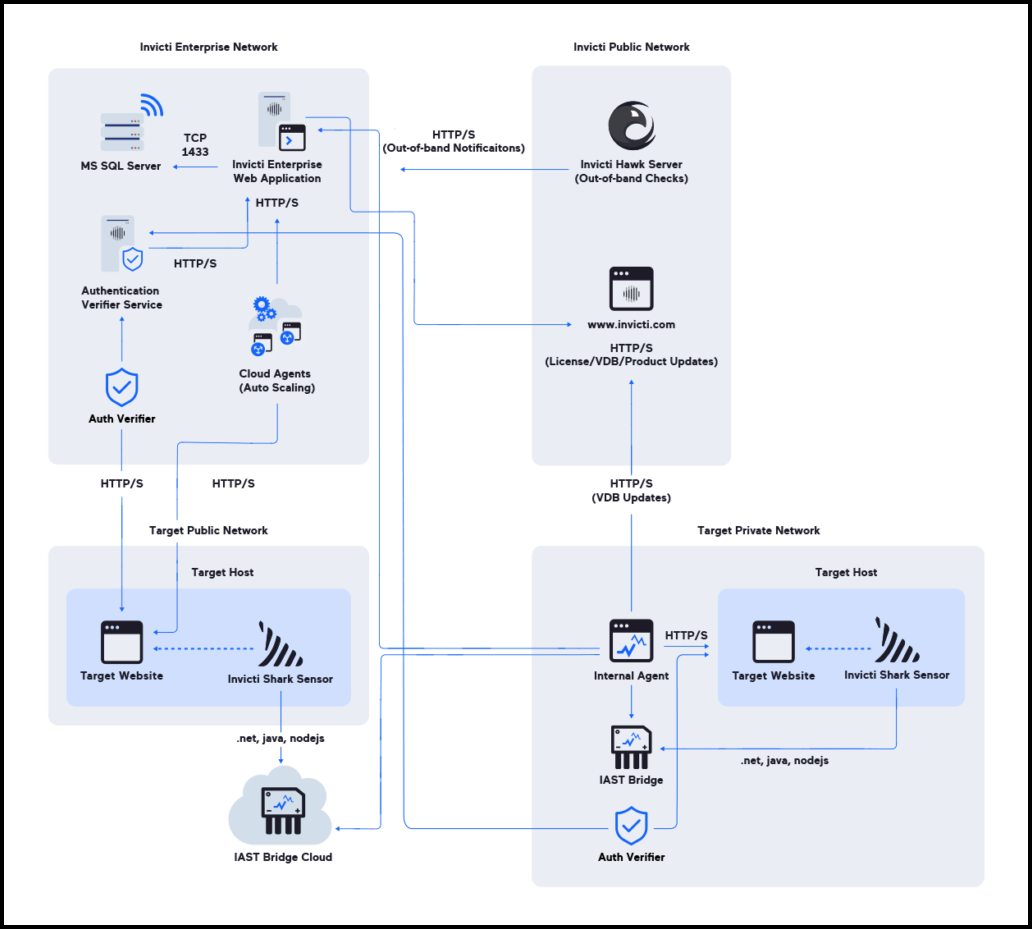
Prerequisites
This section lists the minimum requirements for installing each of the components of Invicti Enterprise on-premises.
Trustlisting requirements
Antivirus
Some antivirus or anti-malware software may prevent Invicti Enterprise on-premises from working or cause it to run very slowly. To ensure you can use Invicti Enterprise on-premises effectively, we recommend adding Invicti Enterprise files and folders to your antivirus (or other protection scanning software) exception list (also known as a 'trustlist').
For more information about the Invicti Enterprise files and folders to exclude from your antivirus software, refer to the Exclude Invicti files from antivirus scans document.
From a networking standpoint, refer to the Trustlisting requirements for Invicti Enterprise on-premises document.
Minimum requirements for the Invicti Enterprise Application Server
All components (the Application Server, the Agent, the Authentication Verifier, the Authentication Verifier Service, the IAST Bridge, and the Database Server) can be installed on the same server if the hardware meets the listed requirements.
It's highly recommended that you install the Application Server, Agents, and Database on separate servers to maximize stability and performance.
| Requirement | Specification |
|---|---|
| Software requirements |
|
| Hardware requirements |
|
| Access requirements |
|
Minimum requirements for the Invicti Enterprise Agent
These are the minimum requirements for installing the Invicti Enterprise Agent.
| Requirement | Specification |
|---|---|
| Software requirements |
|
| Hardware requirements |
|
| Network requirements |
|
| Access requirements |
|
Minimum requirements for the Authentication Verifier Service and Authentication Verifier
These are the minimum requirements for installing the Invicti Enterprise Authentication Verifier Service and Authentication Verifier Agent.
| Requirement | Specification |
|---|---|
| Software requirements |
|
| Hardware requirements |
|
| Network requirements |
|
| Access requirements |
|
Minimum requirements for IAST Bridge
These are the minimum requirements for installing the Invicti IAST Bridge.
| Requirement | Specification |
|---|---|
| Software requirements |
|
| Hardware requirements |
|
| Network requirements |
|
| Access requirements |
|
Minimum requirements for the Database Server
These are the minimum requirements for the Database Server.
The database isn't provided by Invicti. You must set it up yourself.
| Requirement | Specification |
|---|---|
| Software requirements |
|
| Hardware requirements |
|
| Network requirements |
|
| Access requirements |
|
The db_owner permission is required during installation and updating. The db_datareader and db_datawriter roles are enough for daily operations.
Download the installer files
Watch the Invicti Enterprise on-premises installation walk-through video.
Download the installer files
- Download to your server the InvictiEnterprise.zip file that was emailed to you.
- Extract the .zip file to a directory.
- Check that these five files are in the directory:
- WebAppSetup.exe (Invicti Enterprise Application Server installer)
- AgentSetup.exe (Invicti Enterprise Agent installer)
- AuthVerifierAgentSetup.exe (Invicti Enterprise Authentication Verifier installer)
- AuthVerifierServiceSetup.exe (Invicti Enterprise Authentication Verifier Service installer)
- IASTBridgeSetup.exe (Invicti IAST Bridge installer)
If you also purchased Invicti API Security, the .zip file contains an additional file called ApiHubServiceSetup.exe. For instructions on how to install Invicti API Security as a component of Invicti Enterprise on-premises, refer to the Installing Invicti API Security on-premises document.
Need help?
Invicti Support team is ready to provide you with technical help. Go to Help Center