Package: Invicti AppSec Enterprise (on-premise, on-demand)
Checkmarx One SCA integration
Checkmarx One SCA (Software Composition Analysis) is the SCA module within the Checkmarx One unified AppSec platform. It scans open-source dependencies across your repositories to detect known vulnerabilities and license risks. The Invicti AppSec integration connects to Checkmarx One via API and retrieves completed SCA scan results.
Prerequisites
| Field | Description |
|---|---|
| Token | A Checkmarx One API key used as a refresh token for authentication (labeled Token in the UI) |
| Tenant Name | Your Checkmarx One tenant name |
| Checkmarx One IAM URL | The IAM endpoint URL for your Checkmarx One tenant (e.g., https://eu.iam.checkmarx.net) |
Get an API Key (on Checkmarx One Side)
- Log in to your Checkmarx One instance.
- Click your profile icon in the upper right corner and go to My Profile.
- Navigate to the API Keys section.
- Click Generate API Key and provide a name.
- Copy the generated API key immediately — it will not be shown again.
The API key is used as a refresh token when authenticating. Ensure the associated user has at minimum SCA Viewer or SCA Reviewer permissions on the relevant projects.
Step 1: Navigate to Integrations
From the left sidebar menu, click on Integrations.
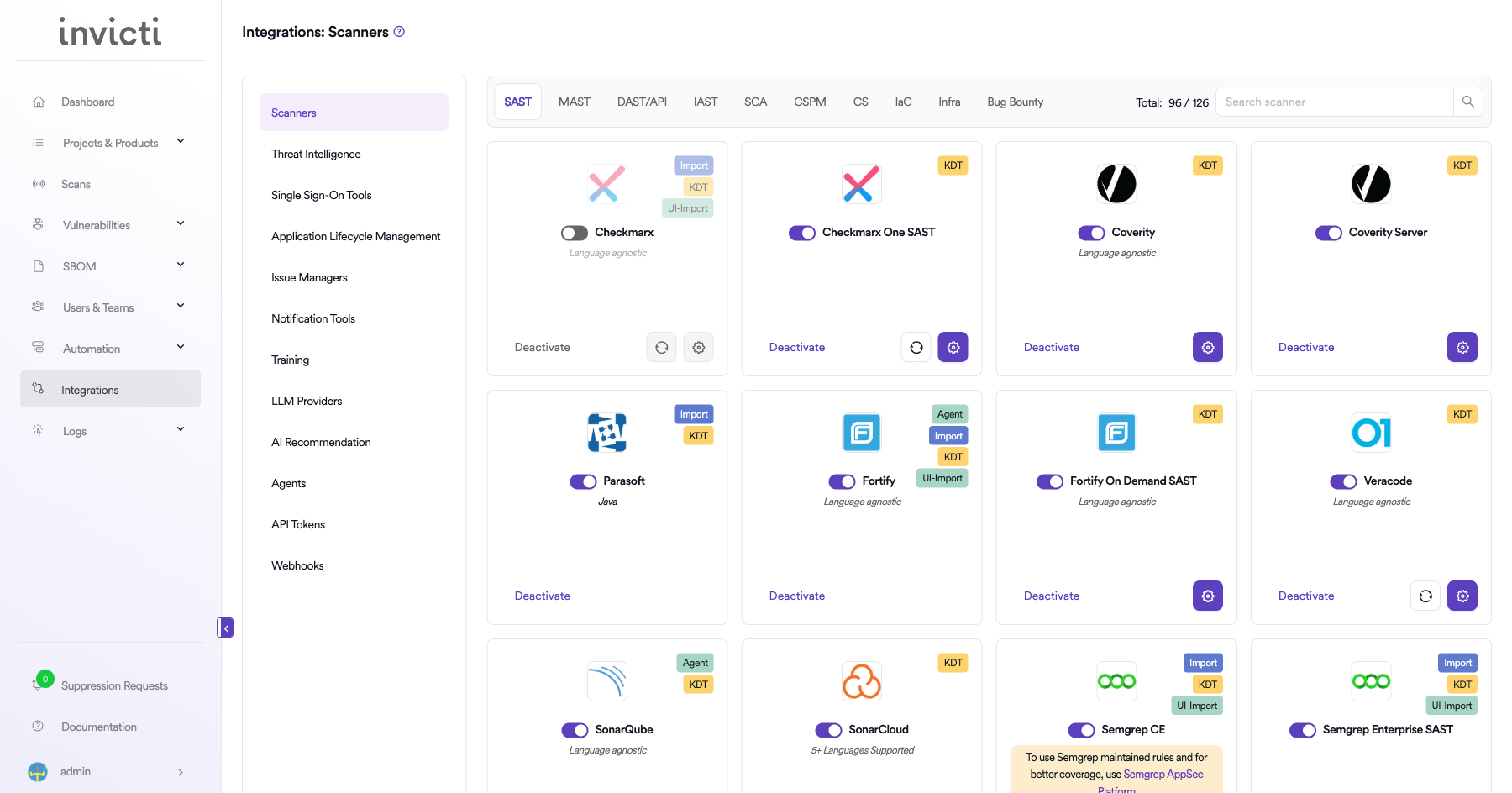
Step 2: Select the SCA Tab
On the Integrations > Scanners page, click on the SCA tab.
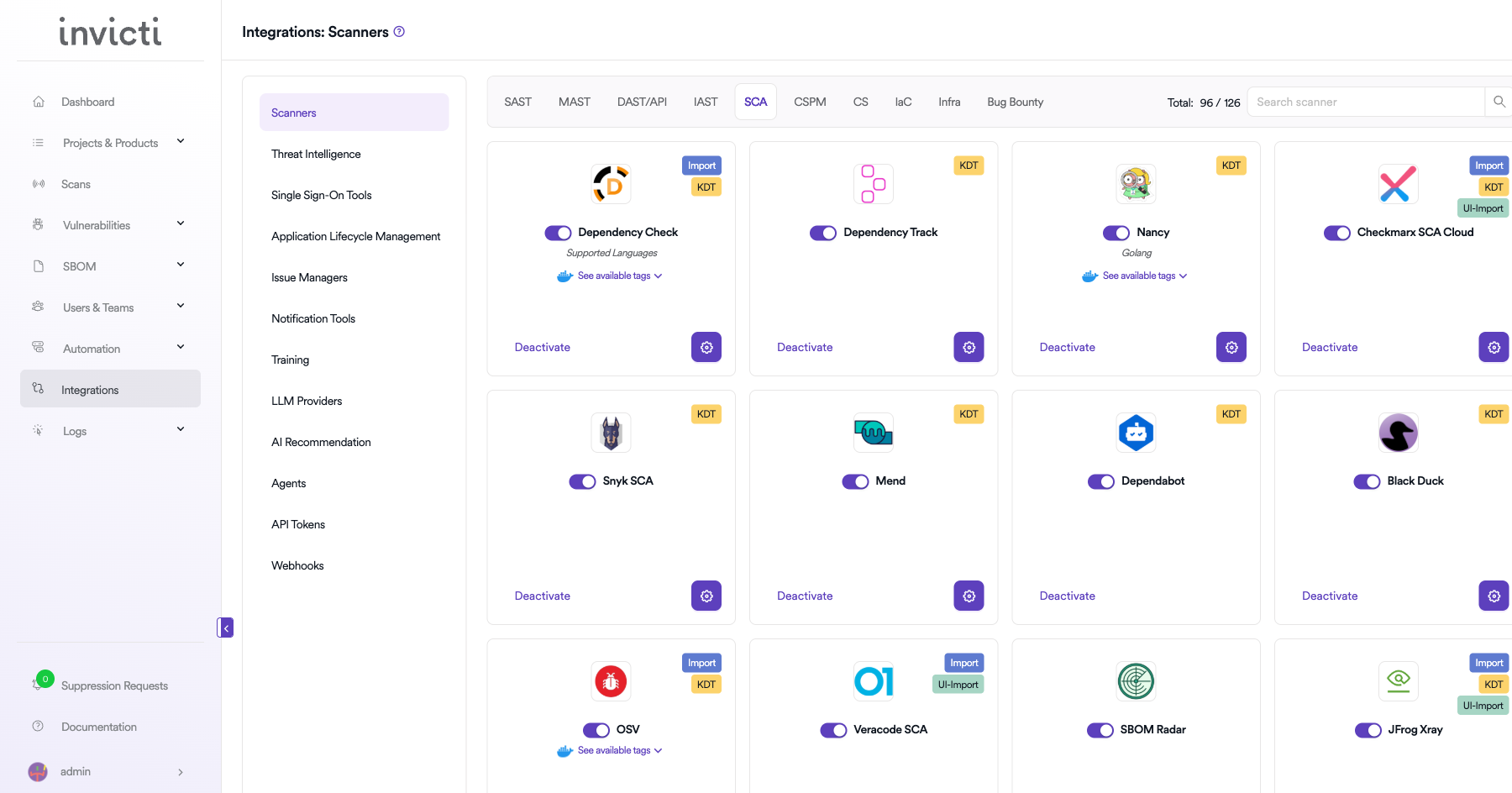
Step 3: Find and Activate Checkmarx One SCA
Scroll through the list of SCA scanners to find Checkmarx One SCA.
- If Checkmarx One SCA is not activated, click the Activate button to enable the integration.
The scan method badges on the Checkmarx One SCA card include Bind and KDT.
Step 4: Configure Connection Settings
Click the gear icon on the Checkmarx One SCA card to open the settings panel. Fill in the required fields:
| Field | Description | Required |
|---|---|---|
| Token | Your Checkmarx One API key (used as a refresh token for authentication) | Yes |
| Tenant Name | Your Checkmarx One tenant name | Yes |
| URL | Checkmarx One IAM URL for your region (e.g., https://eu.iam.checkmarx.net) | Yes |
| Insecure | Enable only if your instance uses a self-signed SSL certificate | No |
Regional IAM URL examples:
- US:
https://iam.checkmarx.net - EU:
https://eu.iam.checkmarx.net - Australia & New Zealand:
https://anz.iam.checkmarx.net - India:
https://ind.iam.checkmarx.net - Singapore:
https://sng.iam.checkmarx.net
The integration automatically converts the IAM URL to the corresponding AST API URL internally (e.g., https://eu.iam.checkmarx.net → https://eu.ast.checkmarx.net). You only need to provide the IAM URL.
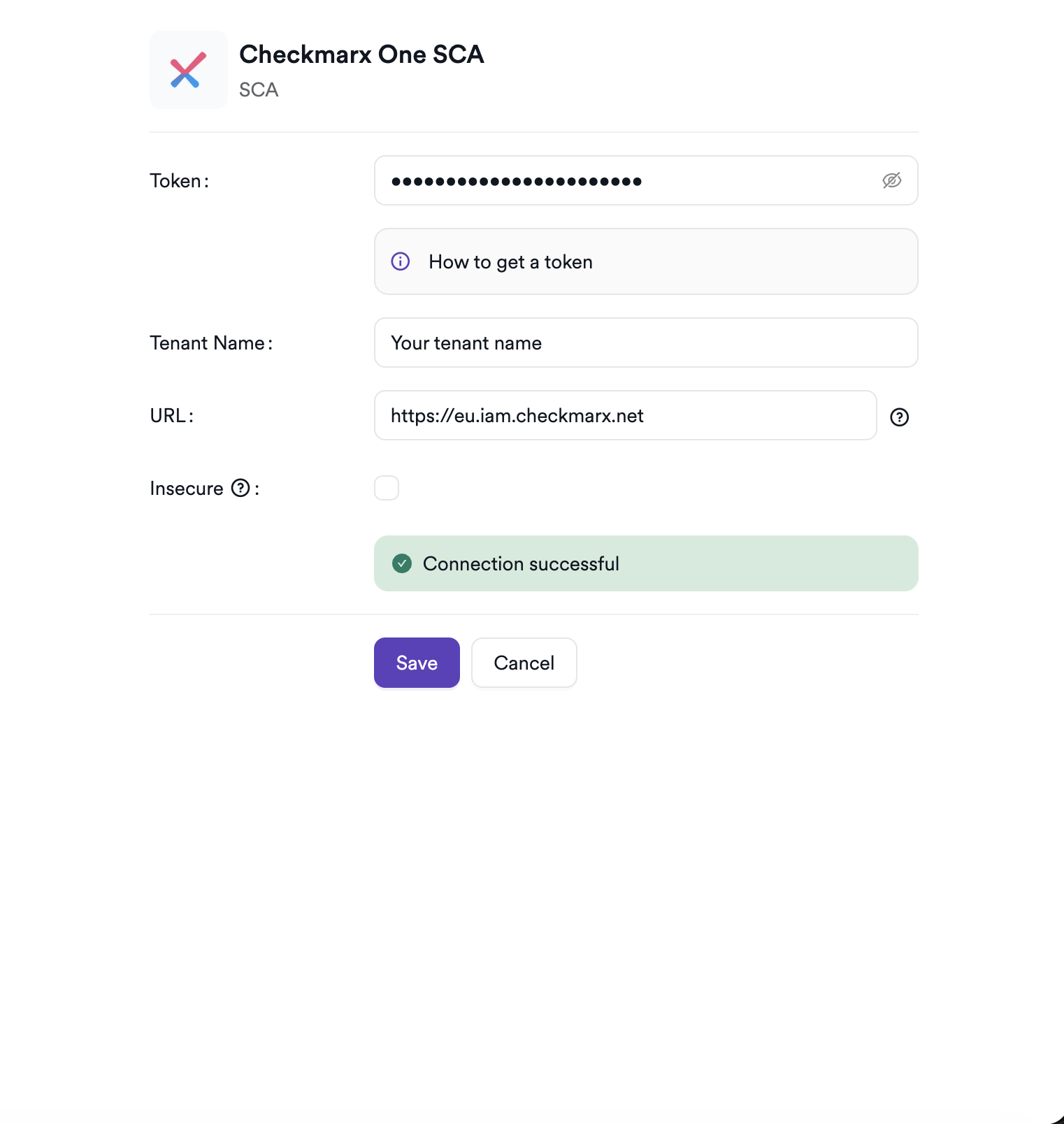
Step 5: Test the Connection
Click Test Connection. A green Connection successful message confirms that Invicti AppSec can authenticate with your Checkmarx One tenant.
Summary
| Step | Action |
|---|---|
| 1 | Navigate to Integrations from the sidebar |
| 2 | Select the SCA tab |
| 3 | Activate Checkmarx One SCA |
| 4 | Enter URL, API Key, and Tenant Name |
| 5 | Test the connection |
Create a Scan
Navigate to Project Scanners
- Open a project in Invicti AppSec.
- Go to Settings > Scanners.
- Click Add Scanner.
Add Checkmarx One SCA Scanner
- Select SCA as the scanner type.
- Choose Checkmarx One SCA from the scanner list.
- Click Add to open the scan configuration drawer.
Scan Configuration Fields
| Field | Description | Required |
|---|---|---|
| Environment | Select the environment for the scan | No |
| Project | Select the Checkmarx One project (loaded from your tenant) | Yes |
| Start Scan | Enable to trigger a new SCA scan in Checkmarx One on every run | No |
| Use Checkmarx Settings | When enabled, skips local clone and uses Checkmarx One's pre-configured Git settings | No |
| Branch | Source code branch associated with this scan | Yes |
| Meta Data | Additional metadata for the scan | No |
| Scan Tag | Tag to identify the scan | No |
When Start Scan is disabled, Invicti AppSec retrieves the latest completed scan from Checkmarx One without triggering a new one. Enable Start Scan for CI/CD pipeline integrations.
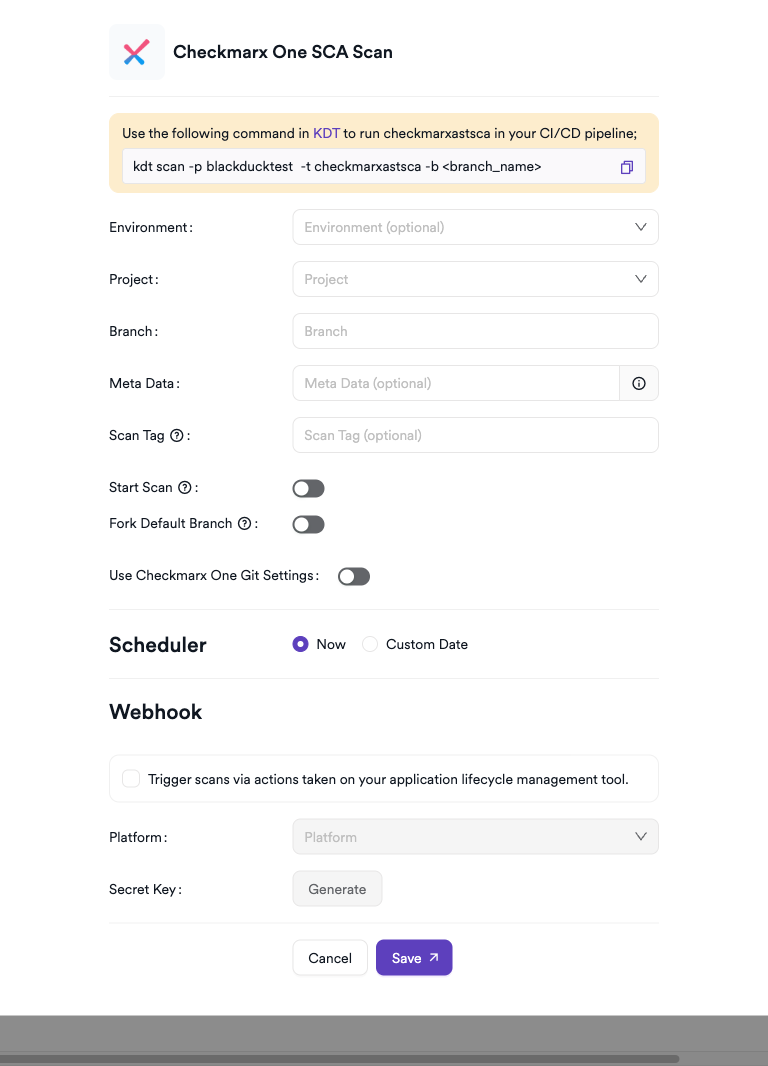
Scheduler
Enable the Scheduler toggle to run Checkmarx One SCA scans on a recurring schedule.
Webhook (Optional)
Add a webhook URL to receive scan completion notifications.
KDT Command
kdt scan -p <project_name> -t checkmarxastsca -b <branch_name>
Troubleshooting
Connection Fails
| Issue | Resolution |
|---|---|
| Invalid API Key | Ensure the API key has not expired and belongs to a user with SCA access. Regenerate if needed. |
| Tenant not found | Verify the tenant name is entered exactly as it appears in your Checkmarx One account settings. |
| Wrong IAM URL | Use the IAM URL that matches your region (e.g., https://eu.iam.checkmarx.net for EU). The integration converts it to the AST API URL automatically. |
| 401 Unauthorized | The API key may have insufficient permissions. Ensure the user has at minimum SCA Viewer access. |
Scan Issues
| Issue | Resolution |
|---|---|
| Project not found | Verify the project name or ID in Checkmarx One. Use the project ID (UUID format) for more reliable lookups. |
| No completed scans | If Start Scan is disabled, ensure at least one completed SCA scan exists in Checkmarx One for the specified branch. |
| Empty results | The project may have no open-source dependencies or the last scan returned no vulnerabilities. |
| Clone fails | Ensure the project has a repository configured in Invicti AppSec, or enable Use Checkmarx Git Config to delegate cloning to Checkmarx One. |
Best Practices
- Use a dedicated service account API key instead of a personal key to prevent disruption when team members leave.
- When using CI/CD pipelines, enable Start Scan and use the KDT command to trigger scans programmatically.
- Prefer using the project ID (UUID) in the scan configuration instead of the name to avoid issues with duplicate project names.
- Enable Use Checkmarx Git Config if your repository is already configured in Checkmarx One to avoid maintaining separate Git credentials.
- Rotate the API key periodically and update the integration settings accordingly.
Limitations
- Invicti AppSec only retrieves SCA-type findings (
scaandsca-container); SAST, KICS, and other result types from the same scan are excluded. - The integration does not support triggering SCA-only scans via the API when Start Scan is enabled — it triggers a full Checkmarx One scan, which may include SAST and KICS depending on your project configuration.
- A maximum of 1,000 SCA results per scan are retrieved from the API due to pagination constraints in Checkmarx One.
- Checkmarx One SCA does not support listing projects via the API in this integration; the project name or ID must be manually entered.
Need help?
Invicti Support team is ready to provide you with technical help. Go to Help Center