Package: Invicti AppSec Enterprise (on-premise, on-demand)
Dependency Check
Dependency Check is one of the open-source scanners available in Invicti AppSec. Like other scanners, it can be enabled and used with a single click; however, some minor configurations are required.
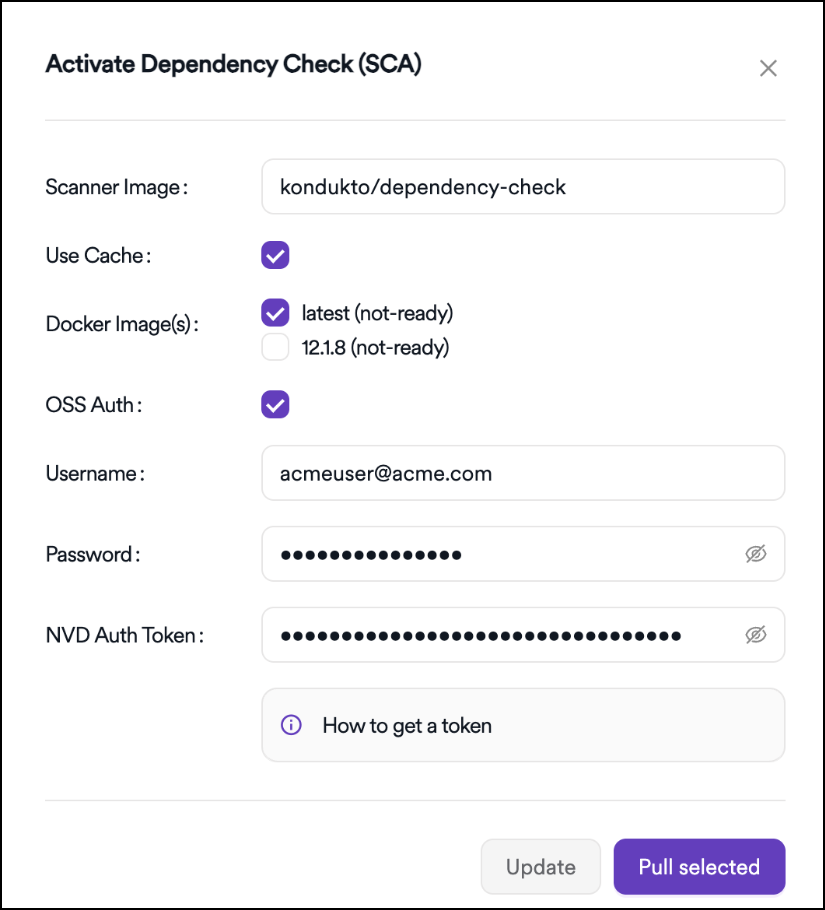
Configuration options
Use cache option
The Use Cache option controls whether the scanner cache is retained. When enabled, more disk space is used, but scan performance is improved.
OSS Auth option
The OSS Auth option is used to provide credentials for an integration user in order to avoid issues such as rate limiting. When enabled, the Username and Password fields become available. Using these credentials helps prevent rate limit–related issues during scans.
NVD token
The NVD Token is required for downloading and updating the vulnerability database used by Dependency Check. During scanning, the vulnerability database is updated from the NVD, and this process requires a token.
An API key can be requested using the NVD API Key Request link. After the request is completed, the token is sent via email.
Need help?
Invicti Support team is ready to provide you with technical help. Go to Help Center