Package: Invicti AppSec Core (on-demand), Invicti AppSec Enterprise (on-premise, on-demand)
OWASP ZAP DAST/API Integration
OWASP ZAP (Zed Attack Proxy) is a widely used open-source DAST tool for finding vulnerabilities in web applications. In Invicti AppSec, OWASP ZAP runs as an agent-based or KDT-managed scanner, meaning no external service credentials are required — scans are executed directly by the Invicti AppSec agent.
OWASP ZAP is an Agent/KDT-based scanner. It does not require connection to an external service. Scans are executed by the Invicti agent installed in your environment or via KDT.
Prerequisites
| Requirement | Description |
|---|---|
| Invicti Agent | An Invicti AppSec agent must be installed and running in the target environment |
| Target URL | The web application URL that the agent can reach and scan |
| Docker | Docker must be installed on the agent host (ZAP runs as a Docker container) |
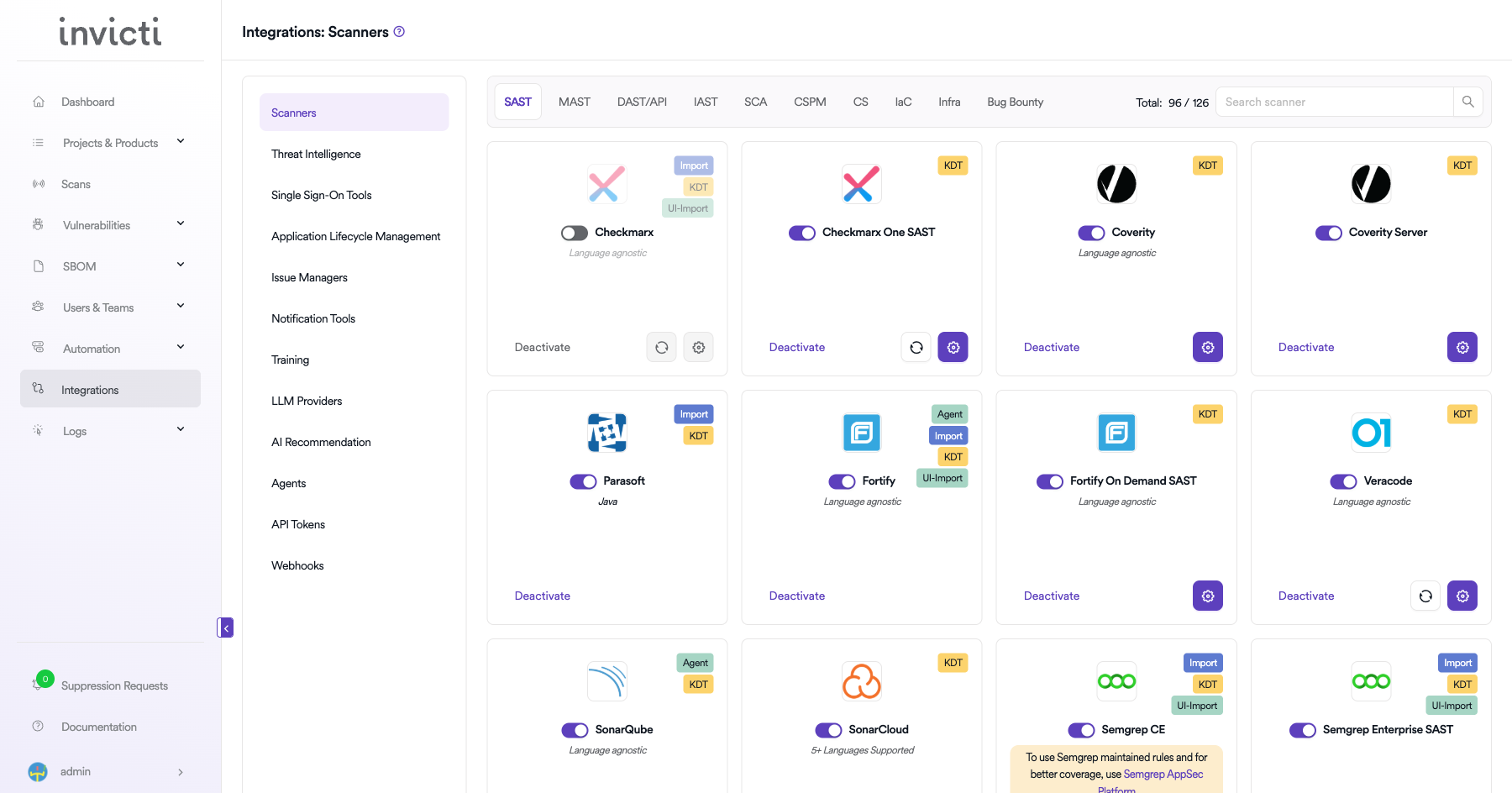
Step 1: Navigate to Integrations
From the left sidebar menu, click on Integrations.
Step 2: Select the DAST/API Tab
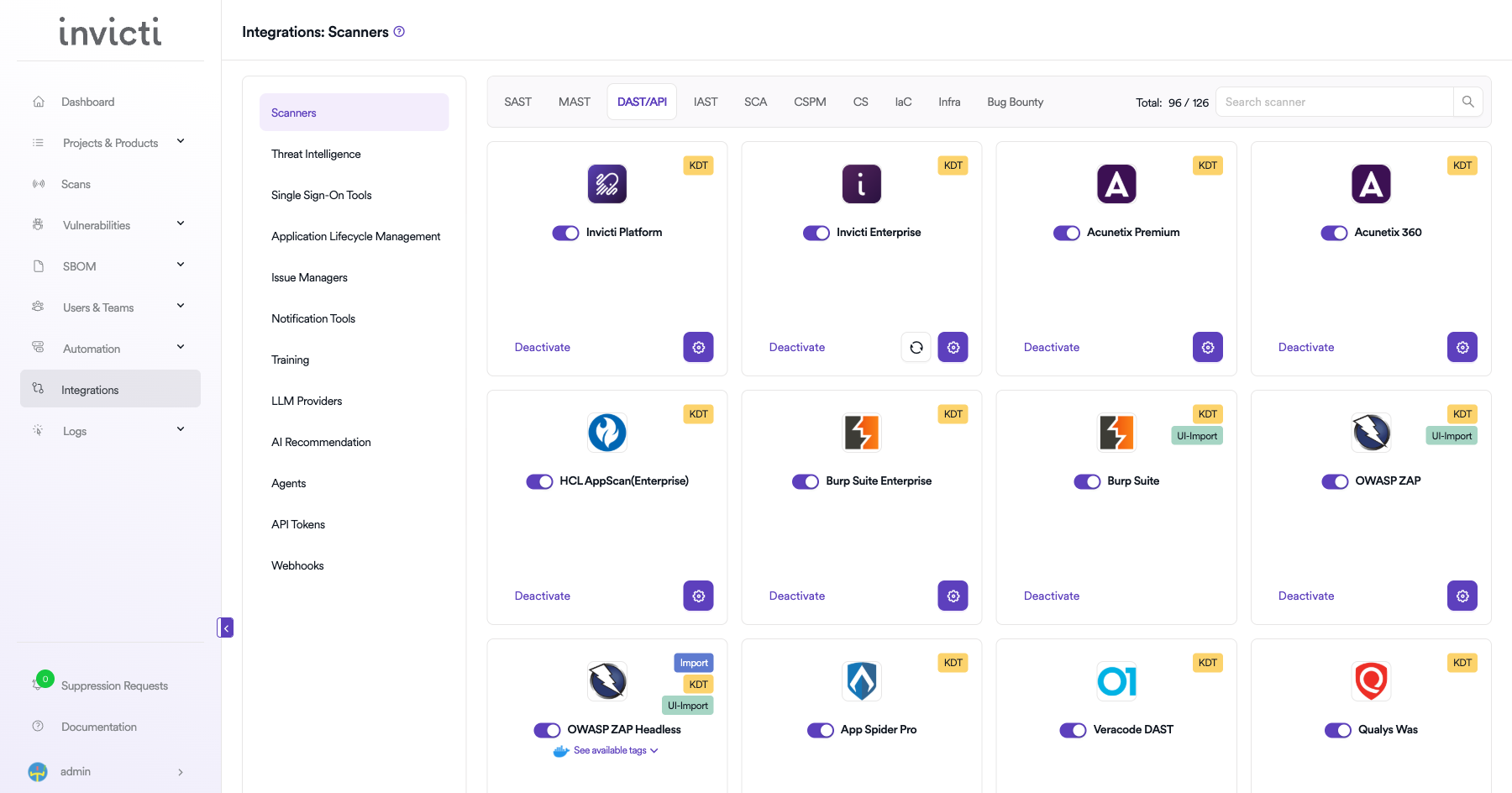
On the Integrations > Scanners page, click on the DAST/API tab.
Step 3: Find and Activate OWASP ZAP
Scroll through the list of DAST/API scanners to find OWASP ZAP.
- If OWASP ZAP is not activated, you will see an "Activate" button. Click it to enable the integration.
The scan method badge on the OWASP ZAP card shows KDT, which means scans are triggered through the Kondukto CLI tool (KDT).
Step 4: Configure Connection Settings
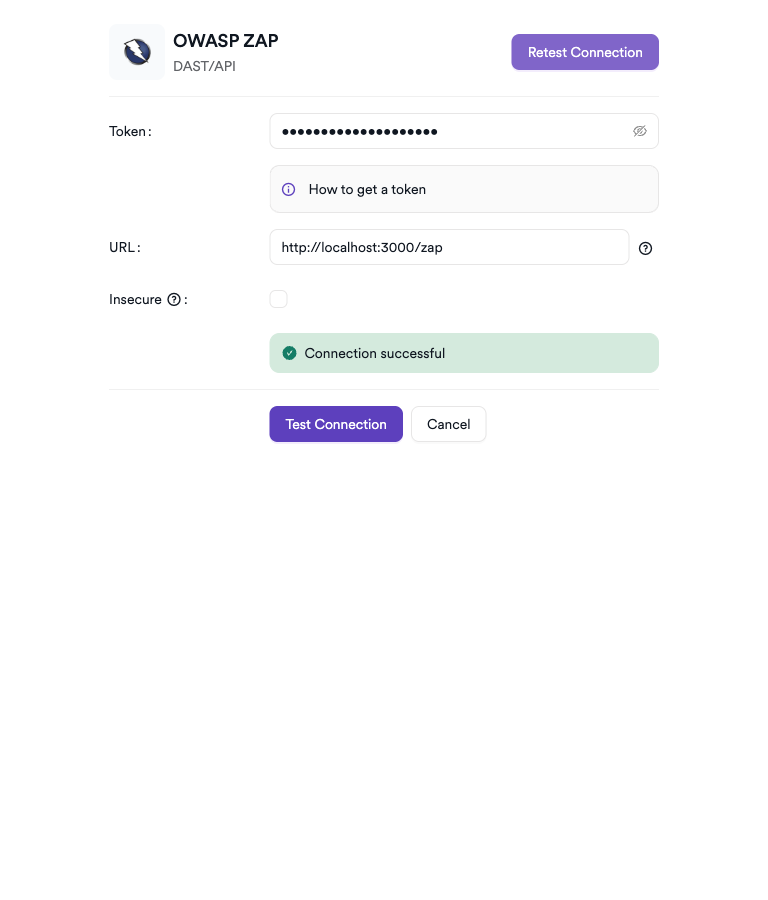
Click on the gear icon on the OWASP ZAP card to open the configuration panel. Fill in the required fields:
- Token: Paste the API token from your OWASP ZAP instance.
- URL: Enter the base URL of your OWASP ZAP instance.
- Insecure: Enable this checkbox only if your OWASP ZAP instance uses a self-signed SSL certificate.
Step 5: Test the Connection
Click Test Connection. A green Connection successful message confirms connectivity.
Summary
| Step | Action |
|---|---|
| 1 | Navigate to Integrations from the sidebar |
| 2 | Select the DAST/API tab |
| 3 | Activate OWASP ZAP |
| 4 | Enter Token, URL, and optional Insecure setting |
| 5 | Test the connection |
Create a Scan
Navigate to Project Scanners
- Open a project in Invicti AppSec.
- Go to Settings > Scanners.
- Click Add Scanner.
Add OWASP ZAP Scanner
- Select DAST/API as the scanner type.
- Choose OWASP ZAP from the scanner list.
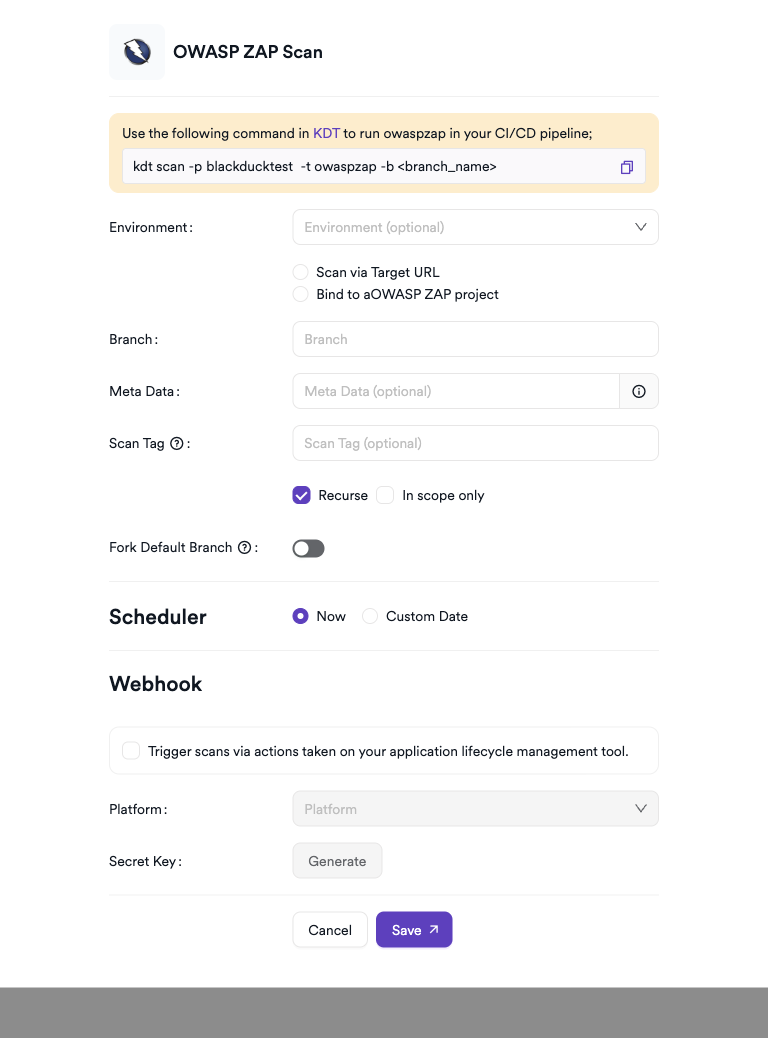
- Click Add to open the scan configuration drawer.
Scan Configuration Fields
| Field | Description | Required |
|---|---|---|
| Environment | Select the environment for the scan | No |
| Scan Type | Scan via Target URL or Bind to an existing project | No |
| Target URL | Web application URL to scan (if Scan Type = Target URL) | Conditional |
| Bind To | Project to bind to (if Scan Type = Bind to project) | Conditional |
| Branch | Source code branch associated with this scan | No |
| Meta Data | Additional metadata for the scan | No |
| Scan Tag | Tag to identify the scan | No |
Scheduler
Enable the Scheduler toggle to run ZAP scans on a recurring schedule.
Webhook (Optional)
Add a webhook URL to receive scan completion notifications.
KDT Command
kdt scan -p <project_name> -t zap -b <branch_name>
Troubleshooting
Scan Issues
| Issue | Resolution |
|---|---|
| Agent not available | Ensure the Invicti agent is installed, running, and connected to Invicti AppSec |
| Docker not found | Install Docker on the agent host and ensure the Docker daemon is running |
| Target not reachable | Verify the target URL is accessible from the agent host (check network/firewall rules) |
| Image pull failed | Ensure the agent host has internet access to pull the ZAP Docker image from Docker Hub |
| Scan timeout | Increase the scan timeout setting or reduce the scan scope |
| Empty results | Use Standard or Full scan mode for more comprehensive coverage |
Best Practices
- Run OWASP ZAP scans in Baseline mode for quick CI/CD pipeline checks.
- Use Full scan mode for scheduled comprehensive security assessments.
- Pin the ZAP Docker image tag to a specific version to ensure reproducible scan results.
- Ensure the agent host has sufficient resources (CPU, RAM) for Docker-based scanning.
- Combine ZAP results with other scanners for broader coverage.
Limitations
- OWASP ZAP requires Docker to be installed on the agent host.
- The target application must be reachable from the agent host network.
- Authenticated scan setup (login scripts, session handling) must be configured manually.
- Scan depth and thoroughness are limited by ZAP's crawling capabilities for complex JavaScript-heavy applications.
- False positive rates may be higher compared to commercial DAST tools; result triaging is recommended.
Need help?
Invicti Support team is ready to provide you with technical help. Go to Help Center