Product overview
This document provides a comprehensive overview of Invicti and a step-by-step implementation guide to help you get the most value from the platform.
Why Invicti DAST
Modern application security needs to focus on real risk, not noise. A DAST-first approach ensures you are securing what actually matters—real, exploitable vulnerabilities in your running applications, rather than theoretical risks buried in static scans.
Invicti specializes in modern web application and API security, providing robust DAST-first vulnerability scanning.
A DAST-first approach focuses on what attackers see
- It scans live applications to find vulnerabilities that can actually be exploited.
Proof-Based Scanning eliminates false positives
- Invicti automatically validates vulnerabilities with proof-of-exploit, so you know what’s real.
Faster remediation, higher efficiency
- Security and development teams focus on fixing what matters most, reducing time wasted on non-issues.
How Invicti DAST works
Vulnerabilities are identified across web apps and APIs by performing functional and behavioral tests, including port 80/443 based security checks. Check out this video for a quick demonstration of all Invicti has to offer.
New to DAST?
We've got you covered. Invicti Learn was created by our team of security experts to educate you on vulnerabilities, attack vectors, protections, and tooling involved in application security.
Implementation Phases
We're excited you've chosen Invicti as your application security platform.
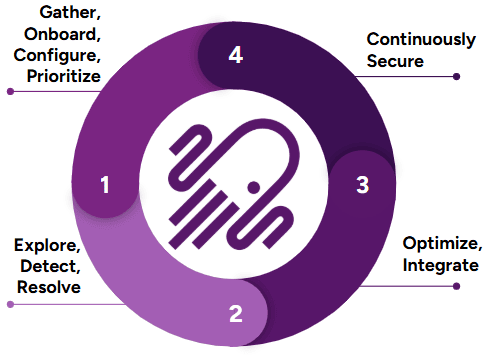
To ensure you get the most out of your first 30 days and beyond with Invicti, we've outlined the important implementation milestones in this recommended order:
- Day 1 – 10: Gather, onboard, configure, and prioritize your first set of web apps and APIs to be scanned with Invicti.
- Day 11 – 20: Explore options in Invicti to help fine-tune your scan results and other customization capabilities along with scaling up your deployment.
- Day 21 – 30: Review and implement any needed integrations to help automate different parts of your workflow.
- Day 31 +: Continue to expand your scanning footprint and review other continued engagement, or features Invicti has to offer.
Phase 1: Gather, add and configure (days 1-10)
In Phase 1 you'll learn how to add users, websites and APIs, install agents and whitelist IPs as needed, so you and other team members can start using Invicti to run scans and find vulnerabilities.
Add users
By providing access to other users, you can distribute responsibilities and tasks with various RBAC settings available with Invicti. Here are some resources to help you add users and create custom roles.
Configure SSO
If you are looking to onboard a large number of users and you are leveraging an SSO provider, Invicti can integrate with any IdP/SSO provider that supports SAMLv2. Additionally, with Invicti SCIM, you can further automate the onboarding process with additional functionality such as creating users and groups.
Install agents
Agents are useful when you are looking to scan web applications and APIs hosted in your internal network. Invicti scan agents are available for different operating systems and only need to be installed on servers that have connectivity to the web applications and APIs to be scanned over port 80/443. Similar to agents, when testing authentication for internal applications, a component known as the Authentication Verifier is also needed. It has the same resource requirements as the Invicti agent and can be installed on the same server as the agent.
An agent can run 1 scan at a time. If you need concurrent scanning, you will need to have more agents to suffice your need for concurrent scans. Multiple agents can be deployed on the same server as long as you have enough resources to host them.
Since the authentication verifier is only used when testing authentication during the configuration stage, you only need to have 1 of these based on your internal network routing to the applications being tested.
Trustlist IPs
Similarly Invicti scanner IPs may need to be trustlisted if you are scanning public facing (external) web applications and APIs that reside behind a WAF. The main functionality of a WAF is to block incoming malicious traffic to your applications. Because of this, automated DAST scanners like Invicti may not be able to successfully test your web applications and APIs for vulnerabilities. To ensure successful testing or access to web applications and APIs with Invicti, whitelisting is recommended. Depending on your region review the following.
Onboard websites and APIs
Once you have successfully installed agents or whitelisted IPs, you can scan either your public facing or internal web applications and APIs. Onboarding web applications and APIs in Invicti begins with identifying which domains and subdomains you want Invicti to scan. The scope of scanning can be further fine tuned at a later stage, but it begins with identifying where you want to start scanning first, your external or internal facing footprint of web applications and APIs. Other settings such as security checks, authentication, uploading API specification files, etc., are done at the Scan Profile creation stage.
Configure scan profiles
Once your targets are onboarded, you are now ready to configure scans. Scan configurations in Invicti can be saved into what are known as Scan Profiles. They consist of configurations around authentication, scope, scan time durations, imported links, API Specifications etc.
- Configure scan profiles
- Review authentication methods
- Import links and API definitions
- Review scan policies
- Scan scope
If you are looking to scan web applications and APIs in production, it may be beneficial to review scan production environments prior to doing so.
Before moving on to Phase 2, make sure you start gathering other targets and authentication related information you may need to start scaling up your deployment.
Predictive risk scoring
As part of gathering targets, perhaps you are aware of all targets you intend to scan with Invicti. In the event that you need to review what targets Invicti has identified in its inventory based on its Application discovery, you can review Discovery results for gathering unknown targets. Learn how you prioritize with Predictive risk scoring if you intend on onboarding any of these targets to scan with Invicti.
Phase 2: Review and report (days 11-20)
As you move on to Phase 2, you are now ready to start reviewing your first scans, identifying areas of improvement if any and looking at ways to scale up your deployment so as to start operationalizing Invicti and building your application security program.
Review vulnerabilities
Once your first few scans with Invicti are completed, you will want to start reviewing your findings and identify opportunities to clean up any potential vulnerabilities that need to be addressed or accept the risk. Vulnerabilities can be reviewed from different sections of Invicti, either from the scan summary page, or the issues tab. Below are some links to help you get started. You can manage issues found from scans based on your organization’s security policies and practices.
To review the whole list of vulnerabilities that Invicti can check for, you can review the Vulnerability index and Vulnerability database index.
Knowledge base
Along with vulnerability information, each technical report's Scan summary also contains a Knowledge base tab of the technical report which provides additional information about the scan such as Interesting Headers, Out of Scope links, Comments, etc. This information also helps security practitioners fine tune scans for better coverage.
Edit severity
There may be a need to change the default severity of a vulnerability based on security assessments of your applications and policies in your organization. To do so, you will need to first understand how custom report policies are created, and the various parameters that go into editing the severity of a vulnerability.
Fine-tune scans
As you are reviewing scan results, there may be other priorities you want to address before scaling up your implementation. Tasks such as, reducing scan times, addressing scan failures, improving coverage, getting more logging information etc. can be done on a case by case basis. You may also be facing some error messages that could use a second look at your scan configuration.
Review this document dedicated to error messages.
If your scans failed because of login related issues, you can continue to review the below on what potential options you can take to resolve these issues.
Advanced authentication
Authentication is a critical component of scan profile configuration. When properly configured, it enables the Invicti scanner to log into the application, allowing it to navigate to and assess vulnerabilities within endpoints that are otherwise inaccessible behind the login screen. Without authentication, the Invicti scan’s scope is limited to crawling and testing only those endpoints that are publicly accessible.
As you gain experience with Invicti and run more scans, you might encounter scenarios where the scan coverage is inadequate despite seemingly correct authentication configuration, or the scan fails due to login issues, or the application requires a different authentication mechanism altogether. To assist you in troubleshooting such authentication-related issues, we offer comprehensive resources that delve deeper into common problems and provide effective solutions.
These resources will cover a wide array of topics, including step-by-step guides on configuring different authentication types, best practices for optimizing authentication settings, troubleshooting techniques for common login failures, and advanced strategies for handling complex authentication scenarios. By leveraging these resources, you can enhance your understanding of Invicti’s authentication mechanisms, fine-tune your scan profiles, and ensure comprehensive coverage of your web applications during vulnerability assessments.
An important thing to remember is that the authentication you are configuring within Invicti will be replayed back during a scan based on the perspective of where the scan is originating from. For example, scans run with Invicti’s cloud agents will be originating from Invicti hosted ips, and scans running from an internal agent will be running from ips and servers in your internal environment. This means that, when troubleshooting authentication issues, it is crucial that you understand your application’s authentication flow from the perspective of an incognito browser from different environments so as to correctly replicate and understand how Invicti will attempt to login during a scan.
Review custom scripts
If authentication was configured in the Form section of a Scan Profile, it is likely that you will have added your username and password to have Invicti use them during a scan. It is important to test these credentials before and from the Logout Detection part of this configuration. Scripts can be customized to fit different use cases (such as multi page authentication flows, applications that use a form of SSO to login, if more parameters other than username or password are needed to log in, etc.) and tested to ensure they will work when used during a scan.
Multi-authentication setups
Authentication against application should always be tested in a browser prior to configuring it in a scan profile. If you happen to identify use cases where your application may use two or more types of authentication, these can be configured in a scan profile and used simultaneously during a scan. Some common use cases of multiple authentication setups include, but not limited to Basic, Digest, NTLM or Kerberos + Form Authentication or Header + Form Authentication.
OTP
If you have an application where an OTP based MFA is needed, here are some potential steps you can take.
-
If OTP has to be enabled. Here are a couple ways in which you can test your application with Invicti.
-
Some other alternative options include
- Creating service accounts that are used solely for configuring authentication in automated testing and scanning purposes which have been approved to not require 2FA based authentication. Any extra security protections applied to the authentication steps of an application are typically seen as bottlenecks for successful automated authentication.
- Reconfiguring your authentication to have a security question type MFA. With Invicti’s custom script editor, multi page authentication can be easily scripted, while also allowing the authentication set up process to be easily automated.
- For the most scalable options, whitelisting (revisit Phase 1) Invicti scanner ips, scanning your application from internal agents or adding custom headers to your scan policy where authentication traffic to your web application can be viewed as coming from a trusted source. Doing this could ensure MFA can be bypassed at scale for a large number of applications.
Prerequest scripts
There may be some authentication flows where a user is not interacting with an application in a web browser to enter a username and password to login, but instead making an API call to a few endpoints to gather tokens that can be used to to perform authenticated operations against other endpoints. In such instances, the use of a Pre Request Script can be made, where in a script will perform all the actions of getting a token prior to every request made by Invicti’s scanner. To use this, you may need to contact Invicti’s support.
OAuth2
Most web applications with authentication types that require a username and password which are typed in a web browser, are configured in the Form authentication section of Invicti with a custom script. In instances where the intent is to only scan an API, configuring such a type of authentication might not be possible. Commonly seen methods for such authentication are built on different OAuth2 flow types. OAuth2 is an authentication type that can be configured in Invicti.
Improve coverage
Without proper coverage, scanning with Invicti may be seen as incomplete, because the scanner did not correctly check for vulnerabilities on all possible paths and endpoints of an application. Once any potential authentication issues are resolved, you can review scan coverage and possibly identify areas of improvements. Whether you are scanning web applications or APIs, here are a few things to consider.
- Understanding how Invicti crawls an application is important so you know where to look and identify potential configuration improvements.
- Scan coverage can be reviewed via the site map or the crawled url report.
- When running a DAST scan, it is important to have an understanding of how your application works. If there are more than one sub-domain involved in helping the application work, you may want to consider adding additional targets. These are needed to ensure Invicti can correctly visualize your application in a scan and assess it for vulnerabilities. You can review possible domains that may have been skipped during your first scan in the Out-of-scope links section.
- Review your Scan scope. In the event you have changed some settings here, it may help to review it again in case a change in settings can help achieve the correct coverage.
- Different types of proxy capture files (for eg: Burp, Fiddler, .Har etc) and API specification files (for eg: OpenAPI3, RAML, WSDL etc) can be imported into Invicti to help with increasing coverage. These imported links are stored and saved in the scan profile section of the configuration and used during the scan to allow the scanner to navigate to endpoints in it. An alternative to adding proxy capture files is the business logic recorder, which helps you to record workflows and navigate to specific endpoints which the scanner may not have been able to on its own. (If you wish to only scan endpoints specified in the imported links or business logic recording, this advanced crawling setting can be disabled.)
- There may be a need to modify some scanning parameters to better crawl your application. It is important to understand the importance of URL rewrite and how to configure the URL rewrite rules.
- There are some settings in the scan policy that can be modified to help increase coverage also. There will be another reference to scan policies in a section below, which covers details around scan time reduction and what changes can be made.
Reduce scan time
As you continue to identify areas of improvement, reducing scan times might be an option to consider given your organization’s security practices or web application development build cadence requirements. While there is not a direct way to correlate the size of an application to how long a scan on it may take, there are some components to keep track of as you start to fine tune settings in Invicti to help reduce scan times.
Logs
While you may not need to review logs generated in Invicti regularly, below is a list of places where you can gather different types of logs and their purpose.
- Audit logs: In order to review a user’s activity within Invicti. These logs can also be sent to a SIEM via Invicti’s API
- Agent logs: While these logs are available on the servers where agents are installed, they can also be requested and downloaded from the Invicti interface. They provide information around the agent performance and communication with Invicti.
- HTTP request logs: HTTP logs are generated on as needed basis to help with troubleshooting or reviewing every single request Invicti’s scanner made during testing. These logs are disabled by default, but can be enabled from within the scan policy section. Running a new scan while using a scan policy enabled with this option will reveal a new button on the top of the scan summary page, once the scan is finished, where you can download the HTTP logs in a Fiddler session format.
- Scan data: Also available on the scan summary page, scan data are logs pertaining to high level information about a scan’s performance. While debug level logging can be enabled, the use of these logs will be helpful when you are troubleshooting issues with the help of Invicti’s support team.
Reports
Once findings have been reviewed, you can generate reports to share with different stakeholders. Reports can be generated from the scan summary tab or automatically sent to stakeholders once scans are completed.
As you approach the end of Phase 2, the tasks don’t end here. There is more to review with Invicti! You can continue performing activities listed in Phase 2, as you move on to Phase 3.
Phase 3: Integrate and automate in bulk (days 21-30)
Moving into Phase 3 you can identify opportunities to start automating different workflows as you continue to use Invicti. Features such as notification workflows, CI/CD integrations, ticketing integrations etc are some of the things you can review as you continue activities of Phase 2.
CICD integrations
Once you have completed the tasks of optimizing your scan configurations to your liking where average scan times, authentication issues and coverage are optimal, then you can start looking into Invicti’s ability of integrating into your CICD pipelines and have scans be initiated as part of your build steps. Invicti offers integration with Azure Pipelines, Github Actions, Gitlab, Jenkins to name a few.
By integrating Invicti into your CICD pipeline you can start implementing DAST scanning earlier in the SDLC to identify real vulnerabilities in your pre production, QA, and other staging environments. While scanning within and after each stage may not be needed, being able to identify vulnerabilities earlier in the lifecycle of developing web applications and APIs will help reduce the cost of having to fix it later if identified in production.
Ticketing integrations
As you have defined cadence of running scans either on a schedule, or ad hoc via the CICD integrations or even manually, automating the generation of tickets to ease the workload of post scan analysis is possible. Invicti offers the ability to integrate with a variety of ticketing systems. Additionally Invicti also offers bi-directional integration with some of those ticketing systems like JIRA, Azure Boards, ServiceNow ITSM, ServiceNow Vulnerability Response, where-in the tickets that are closed, could initiate a retest of the same finding in Invicti allowing for their state to change with-in Invicti to being Fixed if they have been remediated or can Reopen the same ticket if the issue still persists.
Notification workflows
As you further look to automate different parts of Invicti, you can also customize which and how notifications are sent to different stakeholders in your organization depending on scope, types of vulnerabilities and different reports.
Discussed in the previous section on how tickets can be created from Invicti into your ticketing systems, with notification workflows you can also automate the creation of those tickets. With options to filter out the noise and selectively create tickets only for your critical issues which are confirmed by Invicti’s Proof-based scanning, you can be assured that tickets will only be opened for true findings.
Invicti API
Invicti offers a robust API where-in you can perform nearly all tasks that you would do when interacting with Invicti via a web browser with just a few api calls. Once you have reviewed all of the available out-of- the-box automation options Invicti has to offer and you have use cases which may need a custom built solution, you can begin reviewing the Invicti API and identify areas of automation that you may need to help with scaling up your deployment.
Once you have reviewed different areas of improving and automating your workloads pertaining to Invicti, you can continue refining your processes based on your business and security requirements and continue to iterate on your tasks from Phase 2 & 3 as you move into Phase 4.
Phase 4: Additional features and services (days 31+)
After familiarizing yourself with different capabilities of Invicti and automating different aspects of your workflows, you may be left with more curiosity on other capabilities of Invicti. Here are a few more features and services you can review.
API discovery
Invicti also offers the capability to discover APIs being used and published in your environment, with features such as Zero configuration discovery, Integrating into API Management Platforms and a Network Traffic Analyzer (NTA). The NTA can capture traffic, for web applications and APIs using the Kong API Gateway, NGINX, F5 Big IP iRule, or hosted in Kubernetes, where it can capture traffic between pods in a K8s cluster to create an API inventory. These options once configured will allow Invicti to become your centralized API Inventory platform from where you can pick and choose which APIs specifically to onboard and perform DAST testing against. This feature is available as an add-on.
Third-party connections
If you are looking to further develop your application security program and leverage other solutions that can provide SAST, SCA and Container security, Invicti can connect with Mend.io to allow for a single-pane of glass view into the vulnerabilities of your applications in one platform. This feature is available as an add-on.
Professional services
As you are scaling up your implementation of Invicti and identify areas you may need more assistance on, we can help! Our Guided Success program allows you to leverage the guidance of industry experts at Invicti.
Your account team can help add-on Premium Support + Guided Success to your existing subscription. Here’s what you can expect when you add Premium Support + Guided Success to your subscription:
- Bi-Weekly Cadence Calls
- Solution Architecture
- Assisted Deployment
- Standard Integration & API Support
- Education services
- Quarterly Health Check
- Project Management Services
- A High-Level Design (HLD) that captures your goals
- An Implementation Plan with milestones articulating the path and timeline for deployment
- A Customized Training Plan & Schedule for each user
The Guided Success Hours Bundle provides short-term access to an Application Security Manager and/or an Application Security Engineer to assist you with:
- Onboarding Targets
- Scan Analysis
- Vulnerability Analysis (FP/FN)
- Developing Custom Security Checks for specific use cases
- Developing Pre-request scripts to help address one off authentication use cases
- Developing REST API related scripts/tools
- Integration Workarounds
- Trainings related to Custom Security Checks, Pre-Request Scripting and REST API
Guided Success Hours Bundles can be added in increments of 10 hours.
Blogs
For further reading, Invicti has a great blog to be up to date with the latest security news and best practices on how to leverage the solution to fit your business needs.
Support
Invicti Learn
If you’re new to DAST scanning or are beginning your Application Security journey, Invicti Learn is a great resource for best practices and to learn DAST basics invicti.com/learn.
Release notes and roadmap
If you want to know what some of the newer features in Invicti are, or see what Invicti is working on, you can review our public Roadmap page. You can also review the release notes for the on-demand edition and for the on-premises edition to see what improvements have been made in recent releases.
Customer success
If you need help connecting with a Customer Success Manager, feel free to email them directly or open a support ticket and our Support Team will connect you.
Invicti Help Center
The Invicti Help Center is a resource that provides documentation and other helpful information to assist customers in using Invicti effectively. It aims to provide a step-by-step guides to key features, and address common questions and issues.
Need help?
Invicti Support team is ready to provide you with technical help. Go to Help Center