Deployment: Invicti Platform on-demand, Invicti Platform on-premises
Invicti AppSec is available on-demand only. For details, refer to Invicti AppSec.
Technical reference
This document summarizes the architecture, deployment options, scanning capabilities, network requirements, integrations, and limits of Invicti Platform and Invicti AppSec in one place, and links to the detailed documents for each topic.
Why this matters
Evaluating an application security product means knowing where it runs, what your network must allow, what it can scan, and how it connects to your tools. This reference answers those questions in one place, so you can plan a proof of concept, prepare for network and security reviews, and avoid surprises during installation.
Products at a glance
| Invicti Platform | Invicti AppSec | |
|---|---|---|
| Purpose | Web application and API security testing with DAST, API discovery, and vulnerability management | Application security testing across code, dependencies, containers, infrastructure, and running applications, with unified vulnerability management |
| Deployment | On-demand (hosted by Invicti) or on-premises (hosted by you) | On-demand |
| Scanning | DAST with proof-based scanning, API scanning (REST, SOAP, GraphQL), LLM application scanning, and agentic pentests (on-demand) | SAST, SCA, DAST, container, IaC, and secrets scanning |
| Documentation | This site | Invicti AppSec documentation |
Invicti Platform
Architecture
Invicti Platform uses a modular, microservices-based architecture. The on-premises edition runs on Kubernetes and deploys with a Helm chart. The on-demand edition uses the same platform, hosted and operated by Invicti.
The platform is organized into the following layers:
| Layer | Role |
|---|---|
| Presentation | Reverse proxy with TLS termination, the web interface, a unified GraphQL gateway for the user interface, and the REST API documentation |
| Core application | Authentication (OAuth 2.0 and OpenID Connect), user and team management, in-app and email notifications |
| AppSec | Asset inventory and discovery, external scan orchestration, API discovery and management, third-party integrations, and reporting |
| DAST | Scan scheduling and orchestration, the scanning engine, API endpoint reconstruction, and login sequence recording |
| Infrastructure | PostgreSQL for structured data, MongoDB for in-flight scan data, S3-compatible object storage for scan results, a message queue for scan tasks, and an in-memory cache |
| Monitoring (optional) | Metrics, dashboards, alerting, and centralized logs |
The scanning engine runs as autoscaling jobs, so the platform scales scan capacity with demand. By default, the on-premises edition deploys a built-in PostgreSQL database. You can replace it with your own PostgreSQL 16 or later server.
For the full list of components, refer to Architecture of the Helm installation.
In an on-premises installation, you run all of these layers in your own Kubernetes cluster. That can be a cluster you already operate, or the lightweight cluster that the Windows installer sets up for you. The Helm chart pulls the container images from Invicti's registry and exposes the web interface and the API through a single HTTPS entry point on port 443. Scan data stays in your infrastructure, and scanner pods start and stop as scan demand changes. The internal scan agents, the standalone login sequence recorder, and the NTA Reconstructor are optional. They run in your network, outside the cluster.
Deployment models
You can use Invicti Platform as a hosted service or run it in your own environment.
| On-demand | On-premises | |
|---|---|---|
| Hosting | Hosted by Invicti on Amazon Web Services | Hosted by you, on Kubernetes |
| Region and data location | United States, Germany, or Canada. Invicti sets your region when you buy, based on your billing country or your request. Your data is stored and processed in that region. | Entirely within your infrastructure |
| Updates | Invicti updates the platform and the security checks | You upgrade your installation to get new features and security checks |
| Scanning | Cloud agents, internal agents, or both | Scan engines in your cluster, plus internal agents |
On-premises installations have feature differences, such as no PCI ASV scanning and no AI-aided DAST. For the full list, refer to Invicti Platform on-premises overview.
Air-gapped installations, which use offline license activation and manually uploaded security definitions, are available for special cases only. Invicti decides whether an installation qualifies. To ask about it, contact the Invicti Support team.
On-premises installation options
| Method | Best for | Details |
|---|---|---|
| Helm | Existing Kubernetes clusters, including managed cloud clusters and multi-node production setups | Helm installation |
| Windows installer | Windows 11 or Windows Server 2022 or later. The installer runs a lightweight Kubernetes cluster (k3s) in a WSL2 Ubuntu distribution. | Windows prerequisites and Windows installation |
For sizing, refer to Prerequisites and Kubernetes requirements for Helm, and Windows prerequisites for the Windows installer.
Scanning capabilities
Web application scanning
Invicti Platform crawls web applications, including JavaScript-heavy and single-page applications, then tests them for vulnerabilities. It uses proof-based scanning to confirm exploitable vulnerabilities, which reduces false positives. You choose from built-in scan profiles, including full scans, high-risk checks, and profiles aligned with OWASP Top 10, OWASP API Top 10, CWE/SANS Top 25, and PCI checks.
Authenticated scanning
You can scan behind a login. Supported methods include:
- Form-based login
- Recorded login sequences, including the standalone login sequence recorder for internal applications
- OAuth 2.0
- HTTP Basic authentication
- Client certificates
- Custom headers and cookies
- One-time passwords
For more information, refer to Scan authenticated targets.
API scanning
Invicti Platform scans REST, SOAP, and GraphQL APIs from imported or linked specifications (OpenAPI and Swagger, RAML, WADL, WSDL, Postman, and GraphQL schemas). It authenticates with API keys, bearer tokens, JWT, Basic authentication, and OAuth 2.0, and tests for access control vulnerabilities such as BOLA, BFLA, and IDOR. For more information, refer to Overview of scanning APIs.
Discovery
- Website discovery finds web applications that you haven't added as targets. For more information, refer to Introduction to discovery.
- API discovery builds an API inventory from API gateways (Apigee API hub, Amazon API Gateway, MuleSoft Anypoint Exchange, Azure API Management, and Kong Konnect), network traffic analysis, and zero-configuration discovery. For more information, refer to API discovery overview.
Scan agents
- Cloud agents run scans from Invicti-hosted infrastructure for public-facing targets (on-demand only).
- Internal agents run scans from inside your network and send the results to Invicti Platform. You can install an agent on Windows or with Docker, or deploy an autoscaling agent on Kubernetes for scalable scanning.
Other testing capabilities
- Agentic pentests (Octo) use AI agents to probe an application for vulnerabilities and generate a report in the style of a manual penetration test. They're available on-demand only and need the AI Pentesting (Octo) license. Refer to Agentic pentests.
- LLM application scanning tests chatbots and other LLM-based applications for issues such as prompt injection. Refer to LLM-based app vulnerability testing.
- AI features are optional, and you turn them on or off for your organization in the settings. They include predictive risk scoring in Discovery, an AI support assistant, enhanced crawl coverage, and aided auto-login. Refer to Enable AI features. Enhanced crawl coverage and aided auto-login (AI-aided DAST) aren't available on-premises.
Reporting
You can generate reports aligned with compliance standards, including OWASP Top 10, PCI DSS, HIPAA, ISO 27001, and NIST 800-53. Refer to Types of reports.
Network and connectivity
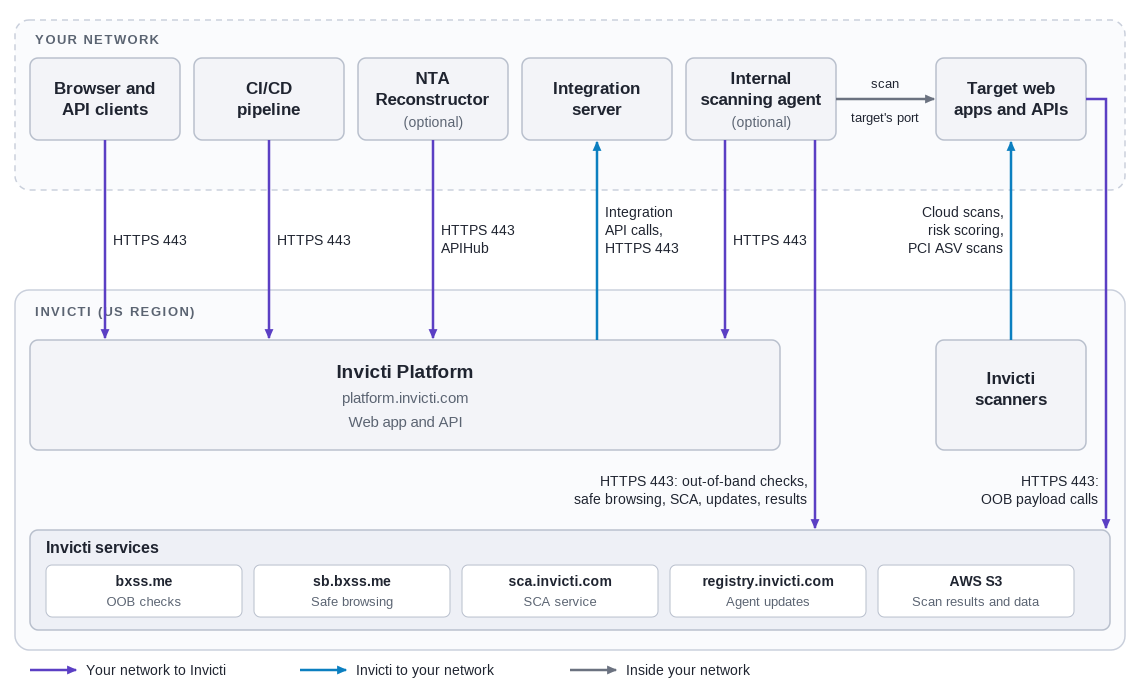
Invicti Platform needs the following network access. The diagram shows the connections for Invicti Platform on-demand in the US region. For the EU and CA regions, use the platform URL and the trustlist for your region. For on-premises installations, refer to Trustlist requirements for Invicti Platform on-premises.
Access to the platform
- Browsers, API clients, and CI/CD pipelines that run the Invicti scan CLI connect over HTTPS on port 443. The platform serves TLS 1.2 or later, and you can provide your own TLS certificate.
- On Windows, the installer also uses port 8088 for the Invicti Platform Control Center. Both ports must be free before installation.
Connections from the platform
| Purpose | Destination |
|---|---|
| Scan your targets | Your web applications and APIs |
| Pull container images during installation (on-premises) | platform-registry.invicti.com |
| License activation (on-premises) | activation.invicti.com |
| Security check and definition updates (on-premises) | sdds.invicti.com |
| Software update checks (on-premises) | static-platform.invicti.com |
| Out-of-band vulnerability checks | bxss.me, sb.bxss.me, and poll.bxss.me |
| Integrations such as Jira, Slack, and Microsoft Teams | The integration service endpoints |
For the complete list, refer to Trustlist requirements for Invicti Platform on-premises.
Internal agents
Internal agents connect outbound to Invicti Platform and fetch scan work from it, so you don't open any inbound port to them. They need access to the platform URL and to the targets they scan. The autoscaling agent on Kubernetes also needs no load balancer. For more information, refer to Introduction to internal site scanning and Install autoscaling agent using Kubernetes.
On-demand platform URLs
| Region | URL |
|---|---|
| United States | https://platform.invicti.com |
| Europe | https://platform-eu.invicti.com |
| Canada | https://platform-ca.invicti.com |
To allow Invicti scanner IP addresses to reach your public-facing targets behind a firewall or WAF, refer to the trustlist for your region: US, EU, or CA.
Security and data protection
- Encryption at rest: AES-256.
- Encryption in transit: TLS 1.2 or later for browser and API access.
- Passwords: Salted hashes (PBKDF2 with HMAC-SHA256). Secrets and tokens are never stored in plain text.
- FIPS: Invicti Platform is FIPS 140-2 compatible but isn't FIPS certified.
- Retention: After a license expires, data is retained for 60 days.
For more information, refer to Data encryption and storage, FIPS compatibility, and Data retention and expired licenses.
Identity and access
- Single sign-on: SAML 2.0, with guides for Okta, Microsoft Entra ID, Google, ADFS, OneLogin, and Ping Identity. Refer to Configure SSO.
- User provisioning: SCIM 2.0. Refer to Set up SCIM provisioning.
- LDAP: You can connect Invicti Platform to your LDAP directory, with SSL turned on by default.
- Roles and teams: Default roles and custom roles with granular permissions. Refer to Default roles and Create and manage roles.
- Audit log: Activity tracking for users. Refer to Audit log.
Some identity features depend on your license.
Integrations
| Category | Supported integrations |
|---|---|
| Issue trackers | Jira (OAuth or basic token), Azure Boards, GitHub Issues, GitLab Issues. Refer to Issue trackers overview. |
| CI/CD | Azure Pipelines, GitLab CI/CD, Jenkins, CircleCI, and GitHub Actions, using a Docker-based scan CLI. Refer to Continuous integration overview. |
| Notifications | Slack, Microsoft Teams, and webhooks |
| Secret managers | HashiCorp Vault, CyberArk, and Azure Key Vault. Refer to Secret managers overview. |
| SIEM | Splunk |
| Security platforms | ServiceNow Vulnerability Response |
| Application security testing | Mend for SAST, SCA, and container findings |
| Identity | SAML 2.0 single sign-on and SCIM 2.0 provisioning |
| API gateways | Apigee API hub, Amazon API Gateway, MuleSoft Anypoint Exchange, Azure API Management, and Kong Konnect. Refer to Add a new API source. |
API surface
Invicti Platform provides a REST API that covers nearly everything you can do in the web interface.
- Interactive documentation: Swagger documentation is available on your instance. For on-demand, it's at
https://platform.invicti.com/swagger/(use the URL for your region). - Authentication: Send your personal API key in the
X-Authheader. The key inherits the permissions of the user who created it. When you generate a key, you can set an optional expiry of 1 to 365 days. Without an expiry, the key doesn't expire. Refer to Manage your API key and Authenticate. - Rate limits: Rate limits apply per tenant. Refer to Handle responses.
- Getting started: Refer to API fundamentals.
The API reference covers the following areas:
| Area | Reference |
|---|---|
| Scans, targets, and scan configuration | DAST API |
| Inventory, applications, and vulnerabilities | Inventory API |
| API inventory and API importers | API inventory API and API importers API |
| Importing results from other tools | AST import API |
| Users, teams, roles, and SCIM | Identity management API and SCIM API reference |
| Integrations | Integrations API |
Limits and constraints
| Item | Value |
|---|---|
| Internal agent resources for each concurrent scan | 2 CPU cores, 6 GB RAM, and 50 GB free disk space. Refer to Introduction to internal site scanning. |
| Active API keys for each user | One. Generating a new key invalidates the previous one. |
| Additional hosts for each target | 10 |
| Vulnerabilities in one retest request through the API | 200 |
| Login sequence recorder file size | 10 MB |
| Imported files for each target (for example, proxy captures and API specifications) | Up to 10 files, each up to 20 MB |
| Data retention after license expiry | 60 days |
Known limitations
- On-premises installations don't support PCI ASV scanning, and AI-aided DAST isn't available.
- On-premises installations need internet access for website discovery and some out-of-band checks, and you must upgrade the installation to receive new security checks.
- Installing Invicti Platform on-premises from macOS isn't supported. Use a Linux-based environment.
- The Windows installer needs Hyper-V and WSL2, so the host must support virtualization. On AWS EC2, use instance types that support nested virtualization.
- An internal agent runs only as many concurrent scans as its host resources allow.
For the full list of on-premises differences, refer to Invicti Platform on-premises overview.
Invicti AppSec
Invicti AppSec is an application security platform that combines security testing tools with AI-powered vulnerability management. It's available on-demand. For the full documentation, refer to the Invicti AppSec documentation.
Architecture and deployment
- Deployment: On-demand, hosted by Invicti on Amazon Web Services.
- Regions: United States, Germany, and Canada. Invicti sets your region when you buy, based on your billing country or your request. Data is stored and processed in that region.
- Encryption: AES-256 at rest and TLS 1.2 or later in transit.
- Retention: After a license expires, data is retained for 60 days.
- FIPS: FIPS 140-2 compatible. It isn't FIPS certified.
For more information, refer to Data encryption and storage, Data retention, and FIPS compatibility.
How code is scanned
SAST, SCA, secrets, IaC, and container scans run in Invicti's cloud, not on a customer-side agent. Invicti accesses your repository through the repository integration. You can turn off cloning for a project, but then code line and committer data isn't available.
Security testing
Invicti AppSec includes six built-in scanners that are added to every new project. For more information, refer to the scanners overview.
| Scanner | What it covers |
|---|---|
| SAST | Static analysis of source code with Invicti SAST. It uses data flow, pattern matching, and control flow analysis, and correlates findings with DAST and IAST results to reduce false positives. Refer to SAST overview. |
| SCA | Invicti SCA finds vulnerabilities and license risks in direct and transitive open-source dependencies, using the National Vulnerability Database and GitHub Security Advisories. It generates software bills of materials (SBOMs) in CycloneDX and SPDX formats. Refer to SCA overview. |
| DAST and API security | Dynamic testing of running applications, with proof-based scanning, for web applications and REST, GraphQL, and SOAP APIs. Refer to DAST overview. |
| Container security | Vulnerabilities, secrets, misconfigurations, and licenses in container images, in registries and Kubernetes clusters. Refer to Container scanning overview. |
| IaC security | Misconfigurations in infrastructure as code before deployment. Refer to IaC overview. |
| Secrets detection | Hardcoded credentials and API keys in your codebase. |
Supported languages (SAST)
Invicti SAST supports 24 languages and file formats: Apex, Bash, C, C#, Clojure, Dockerfile, Elixir, Go, HTML, Java, JavaScript, JSON, Kotlin, OCaml, PHP, Python, Ruby, Rust, Scala, Solidity, Swift, Terraform, TypeScript, and YAML.
Integration model
| Category | Supported integrations |
|---|---|
| Repositories | GitHub, GitHub Enterprise, GitLab (cloud and on-premises), Bitbucket (cloud and Server), and Azure DevOps (Services and Server). Refer to GitHub for an example. |
| Issue trackers | Jira, GitHub Issues, GitLab Issues, Azure DevOps, ServiceNow, Ivanti, Trello, 4me, ServiceCore, and webhooks |
| Threat intelligence | CISA KEV with EPSS, Mandiant, and custom threat intelligence databases |
| Notifications | Email, Mattermost, Microsoft Azure Mail, Slack, and Microsoft Teams |
| API discovery sources | Amazon API Gateway, Apigee API Hub, Azure API Management, IBM API Connect, Kong Konnect, and MuleSoft Anypoint Exchange |
| Internal scanning | Internal DAST agents for applications that aren't reachable from the internet. Refer to Introduction to internal site scanning. |
| Single sign-on | SAML 2.0 single sign-on with Azure AD, Google, Okta, ADFS, OneLogin, Ping Identity, or any other SAML 2.0 provider, plus SCIM 2.0 provisioning. You turn both on in the organization settings. Availability depends on your license. |
For the complete list, refer to the Integrations overview.
Prioritization and automation
- Runtime prioritization: AI-powered risk scoring that considers exploitability, business context, and reachability.
- Threat intelligence: EPSS and Mandiant data feed the risk rating of each vulnerability.
- Service level agreements (SLAs): Set remediation timelines by severity and business criticality.
- Correlation: Group similar findings from one or more scanners into a single ticket.
- Automation rules: Create tickets, send notifications, and suppress findings automatically.
- Add-ons: AI-guided fixes and contextual developer training are available as separate add-ons.
Access control
You can create custom roles in addition to the built-in roles, and assign them to users to control what each user can do.
Known limitations
- Inactive branches are retained for 30 days. The
main,master, anddevelopbranches are kept by default. - Deactivating an integration permanently deletes its historical data. Disabling an integration keeps the data.
- If you disable the repository clone operation for a project, code line and committer data isn't available.
Troubleshooting
The Windows installation fails or the platform shows a Degraded status
The most common causes are insufficient RAM and blocked network access. The 16 GB requirement applies to the WSL2 virtual machine, so the host needs at least 20 GB of RAM in total. Run the pre-installation check before you install to confirm the host meets the requirements and can reach activation.invicti.com and the registries. For more information, refer to Windows prerequisites.
A feature described in the documentation is missing on my on-premises installation
On-premises installations don't include every feature of the on-demand edition. PCI ASV scanning and AI-aided DAST aren't available, and some features need internet access or a license that includes them. For more information, refer to Invicti Platform on-premises overview.
An internal agent runs only one scan at a time
The agent calculates how many scans it can run from the free CPU, RAM, and disk space on its host, and each scan needs 2 CPU cores, 6 GB RAM, and 50 GB of disk space. Add resources or adjust the agent settings. For more information, refer to Introduction to internal site scanning.
Need help?
Invicti Support team is ready to provide you with technical help. Go to Help Center