Product overview
Invicti specializes in web application and API security, providing a platform built for risk posture management. The Invicti Platform delivers a robust vulnerability scanning solution with AI-enhanced Dynamic Application Security Testing.
With additional features such as enhanced API detection, testing multi-step workflows, and LLM scanning, the Invicti Platform enables your organization to keep your web applications and APIs secure as they evolve using modern architectures and frameworks.
Vulnerabilities are identified by performing functional and behavioral tests including port 80/443-based, language agnostic security checks. Web endpoints, previously hidden or unmanaged APIs, then are further validated using Proof-based scanning, reported in a clear and actionable manner across various stakeholders, and integrated with your tools and DevOps workflows to help you smoothly fix real issues.
Implementation phases
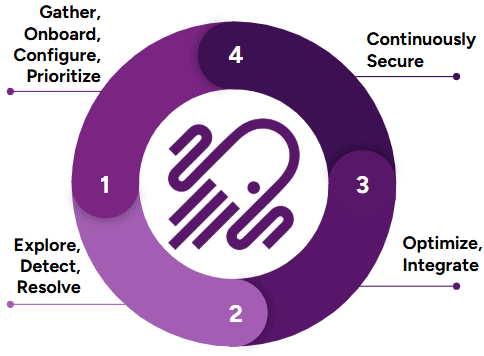
To ensure you get the most out of your first 30 days and beyond with Invicti, we've outlined the important implementation milestones in this recommended order:
- Days 1 - 10: Gather, onboard, configure, and prioritize your first set of web apps and APIs to be scanned with Invicti.
- Days 11 - 20: Explore options in Invicti to help fine-tune your scan results and other customization capabilities along with scaling up your deployment.
- Days 21 - 30: Review and implement any needed integrations to help automate different parts of your workflow.
- Days 31+: Continue to expand your scanning footprint and review other continued engagement opportunities and features Invicti has to offer.
Phase 1: Gather, onboard & configure (days 1 - 10)
Onboard users, websites, and APIs, install agents, and trustlist IPs as needed, so you and other team members can start using Invicti to run scans and find vulnerabilities.
Add users
By providing access to other users, you can distribute responsibilities and tasks with various RBAC settings available with Invicti.
Configure SSO
If you are looking to onboard a large number of users and you are leveraging an SSO provider, Invicti can integrate with any IdP/SSO provider that supports SAML 2.0. Additionally, with Invicti SCIM, you can further automate the onboarding process with additional functionality such as creating, updating, and deactivating accounts.
Install agents
Agents are useful when scanning web applications and APIs hosted in your internal network. Invicti scan agents are available for different operating systems and only need to be installed on servers that have connectivity to the web applications and APIs to be scanned over port 80/443. When testing authentication for internal applications, a component known as the standalone login sequence recorder is also needed to assist in configuring the login sequence, which can be uploaded in the UI for the target's authentication configuration.
An agent can run concurrent scans, it depends on the resources allocated to the host where the agent is installed.
Trustlist IP addresses
Invicti scanner IPs may need to be trustlisted if you are scanning public-facing (external) web applications and APIs that reside behind a WAF. The main functionality of a WAF is to block incoming malicious traffic to your applications. Because of this, automated DAST scanners like Invicti may not be able to successfully test your web applications and APIs for vulnerabilities. To ensure successful testing or access to web applications and APIs with Invicti, it's recommended that you trustlist these IP addresses. Depending on your region, review the following.
Onboard websites and APIs
Once you have successfully installed agents and trustlisted IP addresses, you can scan either public-facing or internal web applications and APIs. Onboarding web applications and APIs in Invicti begins with identifying which domains and subdomains you want Invicti to scan. The scope of scanning can be further fine-tuned at a later stage, but it begins with identifying where you want to start scanning first, your external or internal-facing footprint of web applications and APIs.
Other settings such as scan profiles, authentication, and uploading API specification files can be done once a target has been added.
- Edit target settings
- Edit target scan configuration
- Scan authenticated targets
- Set excluded scanning hours
- Upload API specification
- Use scan profiles
- Use business logic recorder
- Use Custom headers and cookies
Before moving on to Phase 2, make sure to start gathering other targets and authentication related information you may need to start scaling up your deployment.
Predictive risk scoring
As part of gathering targets, you may already be aware of all targets you intend to scan with Invicti. In the event that you need to review what targets Invicti has identified in its inventory based on its Web application discovery, you can review Discovery results for gathering unknown targets. Learn how to prioritize with Predictive risk scoring if you intend to onboard any of these targets to scan with Invicti.
Phase 2: Fine-tune, scale & revise (days 11 - 20)
As you move on to Phase 2 of implementation, you are now ready to start reviewing your first scans, identifying areas of improvement, and looking at ways to scale up your deployment to operationalize Invicti and build your application security program.
Review vulnerabilities
Once your first few scans with Invicti are completed, you will want to start reviewing your findings and identify opportunities to address any vulnerabilities or accept the potential risk. Vulnerabilities can be reviewed from different sections of Invicti, either from the scan summary page or the Vulnerabilities page. Below are some links to help you get started. You can manage issues found from scans based on your organization's security policies and practices.
Along with vulnerability information, you can also take actions such as retesting, ticket creation, changing the status or changing the severity level.
- Change vulnerability status
- Retest vulnerability
- Change severity level for a vulnerability or globally
- Create an issue
- Filter vulnerabilites
To review the list of vulnerabilities the Invicti Platform can check for, refer to the Web Applications Vulnerabilities page.
Reports
Once findings have been reviewed, you can generate reports to share with different stakeholders. Reports can be generated from the scan summary tab.
Fine-tune scans
As you review scan results, there may be other priorities you want to address before scaling up your implementation. Tasks such as reducing scan times, addressing scan failures, improving coverage, and getting more logging information can be done on a case-by-case basis.
When you think about fine-tuning scans, reviewing the common error messages is a good place to start. While some errors might be benign, some might be worth a second look.
Some common troubleshooting topics you may encounter are discussed below.
Advanced authentication
Authentication is a critical component of scan profile configuration. When properly configured, it enables the Invicti scanner to log into the application, allowing it to navigate to and assess vulnerabilities within endpoints that are otherwise inaccessible behind the login screen. Without authentication, the Invicti scan's scope is limited to crawling and testing only those endpoints that are publicly accessible.
As you gain experience with Invicti and run more scans, you might encounter scenarios where the scan coverage is inadequate despite seemingly correct authentication configuration, or the scan fails due to login issues, or the application requires a different authentication mechanism altogether. To assist you in troubleshooting such authentication-related issues, we offer comprehensive resources that delve deeper into common problems and provide effective solutions.
These resources cover a wide array of topics, including step-by-step guides on configuring different authentication types, best practices for optimizing authentication settings, troubleshooting techniques for common login failures, and advanced strategies for handling complex authentication scenarios. By leveraging these resources, you can enhance your understanding of Invicti's authentication mechanisms, fine-tune your scan profiles, and ensure comprehensive coverage of your web applications during vulnerability assessments.
An important thing to remember is that the authentication you are configuring within Invicti is replayed during a scan based on the perspective of where the scan is originating from. For example, scans run with Invicti's cloud agents originate from Invicti-hosted IPs, and scans running from an internal agent run from IPs and servers in your internal environment. This means that when troubleshooting authentication issues, it's crucial that you understand your application's authentication flow from the perspective of an incognito browser in different environments to correctly replicate and understand how Invicti attempts to log in during a scan.
Review login sequence recorder
A login sequence recorder (LSR) is the component of the configuration you will likely be using in cases where you have authentication against your web applications with complex flows, such as through an SSO/IdP over multiple pages, multiple buttons to click to redirect to a login page, etc. Also, if you have Selenium recordings of your login flow, those files can also be uploaded and converted into an LSR.
Making sure your LSR works correctly prior to running a scan is a key part of a correct configuration. You can replay the LSR to ensure you see it logging in correctly.
If for any reason you notice the LSR not replaying the authentication flow as expected, you can try some troubleshooting. A local version of the LSR is also available in case you need to record and validate from an internal perspective.
Multi-authentication setups
Authentication against an application should always be tested in a browser prior to configuring it in the target's settings. If you identify use cases where your application may use two or more types of authentication, these can be configured in the target's settings and used simultaneously during a scan. Some common use cases of multiple authentication setups include, but aren't limited to HTTP (Basic, Digest, NTLM, or Kerberos) + LSR, OAuth + HTTP, etc.
OTP
If you have an application where OTP-based MFA is needed, here are some potential steps you can take.
- If OTP has to be enabled, you can review the following articles for the relevant authentication configuration needed:
- Some other alternative options include:
- Creating service accounts that are used solely for configuring authentication in automated testing and scanning purposes that have been approved to not require 2FA-based authentication. Any extra security protections applied to the authentication steps of an application are typically seen as bottlenecks for successful automated authentication.
- Reconfiguring your authentication to have security question-type MFA. With Invicti's LSR, multi-page authentication can be easily recorded, while also allowing the authentication setup process to be easily automated.
OAuth 2
Most web applications with authentication types that require a username and password which are typed in a web browser, are configured as a login sequence in Invicti with a recording. In instances where the intent is to only scan an API, configuring such a type of authentication might not be possible. Commonly seen authentication implementations for APIs are built on different OAuth2 flow types. OAuth2 is an authentication type that can be configured in Invicti.
Improve coverage
Without proper coverage, scanning with Invicti may be seen as incomplete, because the scanner didn't correctly check for vulnerabilities on all possible paths and endpoints of an application. Once any potential authentication issues are resolved, you can review scan coverage and possibly identify areas of improvements. Whether you are scanning web applications or APIs, here are a few things to consider.
- Scan coverage can be reviewed via the site structure or the CSV locations export.
- When running a scan with Invicti, it's important to understand how your application works. If there is more than one subdomain involved in the application functionality, you may want to consider adding Additional hosts. These are needed to ensure Invicti can correctly visualize your application in a scan and assess it for vulnerabilities. You can review possible domains that may have been skipped during your first scan in the Discovered hosts section.
- Review your Crawling options. If you have changed some settings here, it may help to review them again in case the changes can help achieve the correct coverage.
- Different types of proxy capture files (for example, Burp, Fiddler, .har) and API specification files (for example, OpenAPI 3, RAML, WSDL) can be imported into Invicti to help increase coverage. These imported links are stored in the General section of the configuration and used during the scan to allow the scanner to navigate to endpoints. If you wish to only scan endpoints specified in the imported files, this setting can be enabled.
- An alternative to adding proxy capture files is the business logic recorder, which helps you record workflows and navigate to specific endpoints that the scanner may not have been able to reach on its own.
- If you need to modify some scanning parameters to better crawl your application, it may be a good idea to review whether there are any important headers or cookies that need to be set to scan your application. You can review where Custom headers and cookies can be added.
Reduce scan times
As you continue to identify areas of improvement, reducing scan times might be an option to consider given your organization's security practices or web application development build cadence requirements. While there is no direct way to correlate the size of an application to how long a scan may take, there are some components to keep track of as you start to fine-tune settings in Invicti to help reduce scan times.
Logs
While you may not need to review logs generated in Invicti regularly, here is a list of places where you can gather different types of logs and their purposes.
- Audit logs: Review a user's activity within Invicti. These logs can also be sent to a SIEM via the Invicti API.
- Scan logs: Also available on the scan summary page, scan logs provide high-level information about a scan's performance. These logs need to be enabled in the backend with the help of a support ticket. They are mainly used for advanced troubleshooting and are enabled on a case-by-case basis.
As you approach the end of Phase 2, the tasks don’t end here. There is more to review with Invicti. You can continue performing activities listed in Phase 2, as you move on to Phase 3.
Phase 3: Automate, customize & operate (days 21 - 30)
Moving into Phase 3 of your implementation, you can identify opportunities to start automating your different workflows as you continue to use Invicti. Features such as notification workflows, CI/CD integrations, and ticketing integrations are some of the things you can review as you continue activities from Phase 2.
Recurring scans
Scans kicked off in the Invicti Platform can be instantaneous or scheduled. Recurring scans can be set up when the configuration you have is acceptable enough to not need any more troubleshooting and you can focus on fixing vulnerabilities and developing your application security program.
Applications, collections, and projects
Invicti Platform allows for grouping of your scanned assets in a couple of different ways. Before we discuss grouping, a feature of Invicti to review is its ability to integrate with other Application Security Testing (AST) connections such as Mend. Connecting with Mend allows Invicti to import findings for SAST, SCA, and Container Security. These results are seen in a Project.
Groupings known as Applications or Collections can be created in Invicti for different purposes. In a nutshell, Applications are created to visualize a logical grouping of an environment or list of targets that form an application. Collections are created to better align with business units and manage access control.
API catalog
APIs that have been either discovered or onboarded into the Invicti Platform via the API discovery feature, once linked to a target, can be seen in the API catalog. Here the configuration for allowing Invicti to successfully test BOLA, IDOR vulnerabilities can be done.
Dashboard and analytics
Once you have identified your targets and run scans, you may be interested in seeing this data displayed at a high level. Invicti has a few different places where you can see different types of analytics.
CI/CD integrations
Once you have completed the tasks of optimizing your scan configurations to your liking, where average scan times, authentication issues, and coverage are optimal, you can start looking into Invicti's ability to integrate into your CI/CD pipelines and have scans initiated as part of your build steps. Invicti offers integration with Azure Pipelines, CircleCI, GitHub Actions, GitLab, and Jenkins.
By integrating Invicti into your CI/CD pipeline, you can start implementing DAST scanning earlier in the SDLC to identify real vulnerabilities in your pre-production, QA, and other staging environments. While scanning within and after each stage may not be needed, being able to identify vulnerabilities earlier in the lifecycle of developing web applications and APIs helps reduce the cost of having to fix them later if identified in production.
Ticketing integrations
As you have defined the cadence of running scans either on a schedule or ad hoc via the CI/CD integrations or even manually, automating the generation of tickets to ease the workload of post-scan analysis is possible. Invicti offers the ability to integrate with ticketing systems like Jira (OAuth or HTTPS basic token), Azure Boards, GitLab Issues, and GitHub Issues.
Automations
As you further look to automate different parts of Invicti, you can also customize which and how notifications, tickets, or reports are sent to different stakeholders in your organization depending on scope of vulnerabilities or targets.
As discussed in the previous section on how tickets can be created from Invicti into your ticketing systems, with Automations you can also automate the creation of those tickets. With options to filter out the noise and selectively create tickets only for your critical issues which are confirmed by Invicti's Proof-Based Scanning, you can be assured that tickets are only opened for true findings.
API discovery
Invicti also offers the capability to discover APIs being used and published in your environment. With capabilities such as Zero configuration API discovery, Integrating into API Management Platforms, and a Network Traffic Analyzer which can capture traffic to create an API inventory. These options once configured allows Invicti to become your centralized API Inventory Platform from where you can pick and choose which APIs specifically to onboard and perform DAST testing against.
AI features
Invicti Platform offers a variety of optional AI capabilities that you can enable to enhance different aspects of your user experience.
LLM scanning
Invicti now offers the ability to scan LLM chatbots too. If your web applications have a chatbot, that may leverage an LLM, Invicti can perform checks like prompt injections, insecure output handling etc. For more information regarding the LLM scanning capability, review this LLM-based app vulnerability testing document, blogpost or podcast discussion.
Invicti API
Invicti offers a robust API wherein you can perform nearly all tasks that you would do when interacting with Invicti via a web browser with just a few API calls. Once you have reviewed all of the available out-of-the-box automation options Invicti has to offer and you have use cases that may need a custom-built solution, you can begin reviewing the Invicti Platform API and identify areas of automation that you may need to help with scaling up your deployment.
Once you have reviewed different areas of improving and automating your workloads pertaining to Invicti, you can continue refining your processes based on your business and security requirements and continue to iterate on your tasks from Phases 2 and 3 as you move into Phase 4.
Phase 4: Continued engagements & other resources (days 31+)
As you approach the end of the first 30 days of familiarizing yourself with different capabilities of Invicti and automating different aspects of your workflows, there may be additional services provided by Invicti that you could leverage, as you look to build your application security program.
Professional services
As you scale up your implementation of Invicti and have identified areas where you may need more assistance, you may want to look into leveraging the guidance of industry experts at Invicti who can help. While some services are offered as an extra add-on, the Professional Services team at Invicti can assist with tasks such as:
- Performing a health check 6+ months into your journey with Invicti to review your implementation and offer guidance on current best practices and process improvements.
- Creating scripts for automating different tasks and workflows based on your needs using the Invicti API.
Blogs
For further reading, Invicti has a great blog to stay up to date with the latest security news and best practices on how to leverage the solution to fit your business needs.
Support
For critical issues and immediate assistance, you have access to our support team. You can create an account here to open support tickets, keep track of them, and have access to other troubleshooting articles.
Invicti Learn
If you’re new to DAST scanning or are beginning your Application Security journey, Invicti Learn is a great resource for best practices and to learn DAST basics.
Release notes and roadmap
If you want to know what some of the newer features in Invicti are, or see what Invicti is working on, you can review our public Roadmap page. You can also review the release notes for the on-demand edition, the on-premises edition, or the security checks and runtime SCA findings to see what improvements have been made in recent releases.
Customer success
If you need help connecting with a Customer Success Manager, feel free to email them directly or open a support ticket and our Support Team will connect you.
Invicti Help Center
The Invicti Help Center is a resource that provides documentation and other helpful information to assist customers in using Invicti effectively. It aims to provide a step-by-step guides to key features, and address common questions and issues.
Need help?
The Invicti Support team is ready to provide you with technical help. Go to Help Center